Anatomy of Slash Commands
Anatomy of /commands and design patterns.
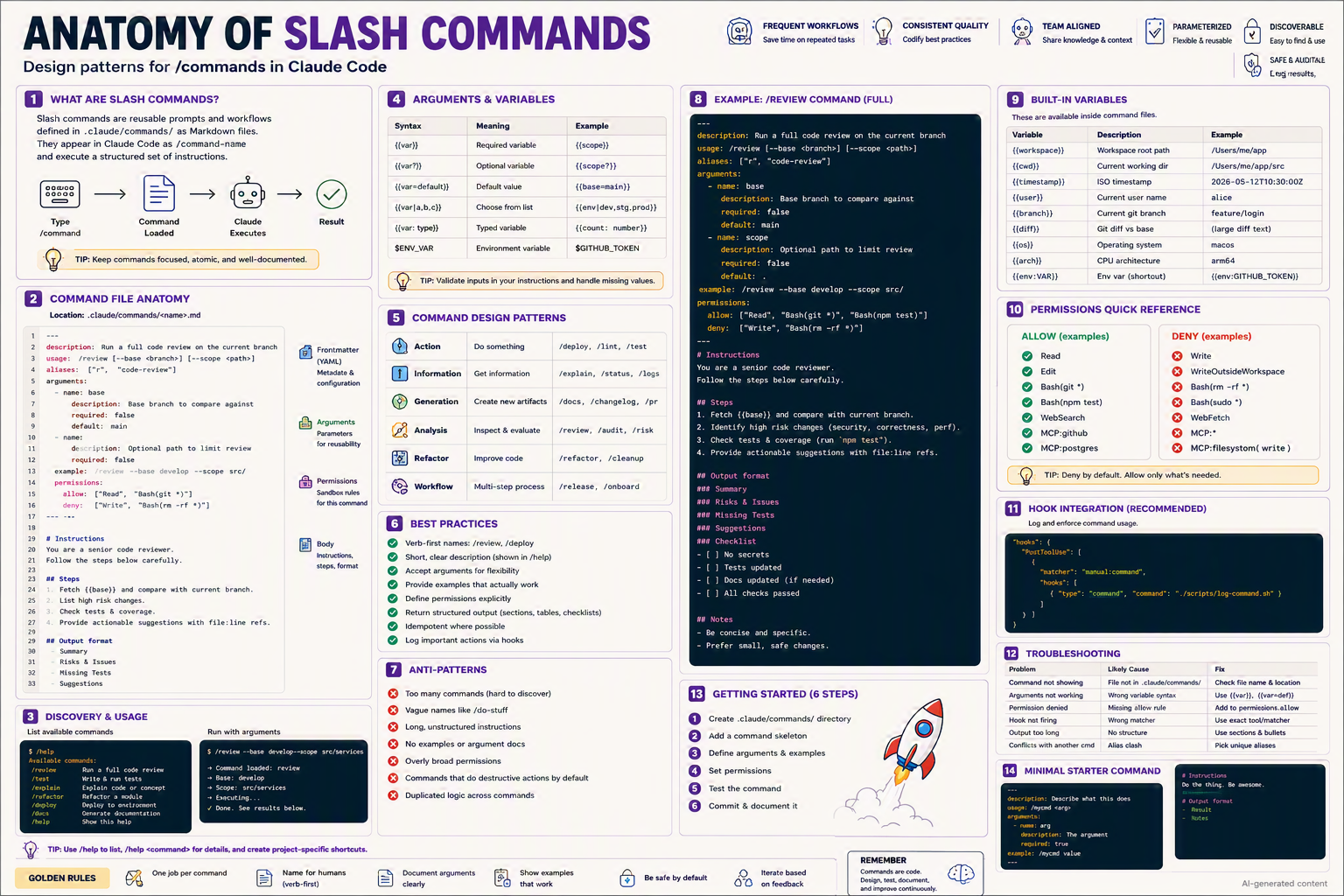
Design patterns for
/commandsin Claude Code — reusable, parameterized, auditable workflows triggered with one keystroke.
TL;DR
- A slash command is a Markdown file under
.claude/commands/that Claude treats as a reusable prompt. - Invoke as
/<filename>(e.g.,/review,/deploy). - Each command can declare arguments, permissions, aliases, examples, and a structured instructions body.
- They turn tribal knowledge into one-keystroke workflows.
- Best when each command is one job, well-documented, idempotent.
Why this matters
Imagine typing make test instead of remembering the exact 6-step test pipeline. Slash commands are make for AI work — codify the playbook once, run it forever.
Bottom line: They're how you turn "ask Claude nicely" into "execute the company's playbook."
The Big Picture
Bottom line: Type → load → render → execute → ship.
Command File Anatomy
A slash command file has three sections:
---
description: Run a full code review on the current branch
usage: /review [--base <branch>] [--scope <path>]
aliases: ["r", "code-review"]
arguments:
  - name: base
    description: Base branch to compare against
    required: false
    default: main
  - name: scope
    description: Optional path to limit review
    required: false
    default: .
example: /review --base develop --scope src/
permissions:
  allow: ["Read", "Bash(git *)", "Bash(npm test)"]
  deny:  ["Write", "Bash(rm -rf *)"]
---

# Instructions
You are a senior code reviewer.
Follow the steps below carefully.

## Steps
1. Fetch {{base}} and compare with current branch.
2. Identify high risk changes (security, correctness, perf).
3. Check tests & coverage (run `npm test`).
4. Provide actionable suggestions with file:line refs.

## Output format
### Summary
### Risks & Issues
### Missing Tests
### Suggestions

## Checklist
- [ ] No secrets
- [ ] Tests updated
- [ ] Docs updated (if needed)
- [ ] All checks passed

## Notes
- Be concise and specific.
- Prefer small, safe changes.
| Section | Purpose |
|---|---|
| Frontmatter (YAML) | Metadata & configuration |
| Arguments | Parameters for reusability |
| Permissions | Sandbox rules scoped to this command |
| Body (Markdown) | The actual instructions Claude runs |
Arguments & Variables
| Syntax | Meaning | Example |
|---|---|---|
{{var}} | Required variable | {{scope}} |
{{var?}} | Optional variable | {{scope?}} |
{{var=default}} | Default value | {{base=main}} |
{{var|a|b|c}} | Choose-from list | {{env|dev|stg|prod}} |
{{var: type}} | Typed variable | {{count: number}} |
$ENV_VAR | Environment variable | $GITHUB_TOKEN |
💡 Tip: Always validate inputs in your instructions and handle missing values gracefully.
Built-in Variables (always available)
| Variable | Description | Example |
|---|---|---|
{{workspace}} | Workspace root path | /Users/me/app |
{{cwd}} | Current working dir | /Users/me/app/src |
{{timestamp}} | ISO timestamp | 2026-05-12T10:30:00Z |
{{user}} | Current user name | alice |
{{branch}} | Current git branch | feature/login |
{{diff}} | Git diff vs base | (large diff text) |
{{os}} | Operating system | macos |
{{arch}} | CPU architecture | arm64 |
{{env:VAR}} | Env var (shortcut) | {{env:GITHUB_TOKEN}} |
Command Design Patterns
Pick the pattern that matches your intent:
| Pattern | Purpose | Examples |
|---|---|---|
| 🎯 Action | Do something | /deploy, /lint, /test |
| 📖 Information | Get information | /explain, /status, /logs |
| 🛠️ Generation | Create new artifacts | /docs, /changelog, /pr |
| 🔍 Analysis | Inspect & evaluate | /review, /audit, /risk |
| ✂️ Refactor | Improve code | /refactor, /cleanup |
| 🔄 Workflow | Multi-step process | /release, /onboard |
Step-by-Step Setup
1. Create the commands directory
mkdir -p .claude/commands
2. Create your first command
cat > .claude/commands/review.md <<'EOF'
---
description: Review the current branch
usage: /review [--base <branch>]
arguments:
  - name: base
    default: main
permissions:
  allow: ["Read", "Bash(git *)"]
---
# Instructions
Review changes vs `{{base}}`. Report risks, missing tests, and concrete fixes.
EOF
3. Verify it's discoverable
/help            # lists available commands
/help review     # shows details for one command
4. Run it
/review --base develop
5. Iterate
Refine the instructions after each real use; commit changes.
Variants for Different Team Settings
👤 Solo developer
Keep commands minimal. One job each: /review, /test, /deploy.
👥 Small team (2–10)
- Commit
.claude/commands/so everyone shares the same shortcuts. - Add a
/helpindex command listing local conventions. - Standardize argument names (
--base,--scope,--env).
🏢 Enterprise / regulated
- Pin permissions tightly per command (no
allow: ["*"]). - Require code review for any command change.
- Add an audit hook logging every command invocation.
"hooks": {
  "PostToolUse": [
    { "matcher": "manual:command",
      "hooks": [{ "type": "command", "command": "./scripts/log-command.sh" }] }
  ]
}
- Sign commands and ship via a plugin (see Plugins anatomy).
🌍 Open-source / community
- Document every command in
CONTRIBUTING.md. - Include
/onboardas the first command new contributors run. - Avoid environment-specific commands; parameterize aggressively.
Bottom line: Same skeleton, escalating governance.
Anatomy of a Single Command — Zoom in on /review
---
description: Run a full code review on the current branch
usage: /review [--base <branch>] [--scope <path>]
aliases: ["r", "code-review"]
arguments:
  - name: base
    description: Base branch to compare against
    required: false
    default: main
  - name: scope
    description: Optional path to limit review
    required: false
    default: .
example: /review --base develop --scope src/
permissions:
  allow: ["Read", "Bash(git *)", "Bash(npm test)"]
  deny:  ["Write", "Bash(rm -rf *)"]
---

# Instructions
You are a senior code reviewer.
Reference `CLAUDE.md` for project conventions.

## Steps
1. Run `git fetch origin {{base}}`.
2. Get diff: `git diff origin/{{base}}...HEAD -- {{scope}}`.
3. Categorize: 🔴 Critical · 🟡 Concern · 🟢 Suggestion.
4. Check tests: `npm test`.
5. Report findings with `file:line` references.

## Output format
### Summary
### Risks & Issues
### Missing Tests
### Suggestions
### Checklist
- [ ] No secrets
- [ ] Tests pass
- [ ] Docs updated
Common Patterns & Recipes
Pattern 1 — Pipeline command
---
description: Pre-release checks
usage: /release [--env prod|staging]
---
Run in order, stop on first failure:
1. `npm run lint`
2. `npm test`
3. `npm run build`
4. `git diff main..HEAD`
5. Generate changelog summary.
Pattern 2 — Conditional logic
{{#if env == "prod"}}
⚠️ Require human approval before continuing.
{{/if}}
Pattern 3 — Delegate to a subagent
Use the `@code-reviewer` subagent on this diff.
After review, hand off to `@test-writer` for any missing tests.
Pattern 4 — Composable commands
First run `/lint`, then `/test`, then `/changelog`.
Halt and report on any failure.
Pattern 5 — Interactive (ask first)
Before running destructive steps, ask:
"Confirm deployment to {{env}}? (yes/no)"
Only continue on explicit "yes".
Pattern 6 — Self-documenting /help
---
description: List project commands
usage: /help [command]
---
List every `.claude/commands/*.md` with its `description` field.
If `{{command?}}` given, print its full content.
Built-in Slash Commands (reference)
| Command | Purpose |
|---|---|
/help | List all commands or get help on one |
/init | Bootstrap CLAUDE.md and .claude/ |
/clear | Reset session context |
/exit | Quit Claude Code |
/model | Switch model mid-session |
/mcp | List/inspect MCP servers |
/permissions | Inspect current permissions |
/config | View merged effective settings |
💡 Tip: Don't reuse built-in names.
/init.mdwill be overshadowed.
Discovery & Usage
List available commands
/help
Available commands:
  /review     Run a full code review
  /test       Write & run tests
  /explain    Explain code or concept
  /refactor   Refactor a module
  /deploy     Deploy to environment
  /docs       Generate documentation
Run with arguments
/review --base develop --scope src/services

Command loaded: review
→ Base: develop
→ Scope: src/services
→ Executing…
→ Done. See results below.
Permissions Quick Reference
| ✅ ALLOW (examples) | ❌ DENY (examples) |
|---|---|
Read | Write |
Edit | WriteOutsideWorkspace |
Bash(git *) | Bash(rm -rf *) |
Bash(npm test) | Bash(sudo *) |
WebSearch | WebFetch |
MCP:github | MCP:* |
MCP:postgres | MCP:filesystem(write) |
💡 Deny by default. Allow only what's needed.
Hook Integration (recommended)
Log and enforce command usage via a PostToolUse hook:
"hooks": {
  "PostToolUse": [
    {
      "matcher": "manual:command",
      "hooks": [
        { "type": "command", "command": "./scripts/log-command.sh" }
      ]
    }
  ]
}
log-command.sh:
#!/usr/bin/env bash
echo "$(date -Iseconds) | $USER | $CLAUDE_COMMAND_NAME | $CLAUDE_COMMAND_ARGS" \
  >> .claude/logs/commands.log
Best Practices ✅
- Verb-first names:
/review,/deploy,/explain. - Short, clear description (shown in
/help). - Accept arguments for flexibility, with sensible defaults.
- Provide examples that actually work.
- Define permissions explicitly; deny by default.
- Return structured output (sections, tables, checklists).
- Idempotent where possible — safe to re-run.
- Log important actions via hooks.
Anti-Patterns ❌
- Too many commands — hard to discover.
- Vague names like
/do-stuffor/run. - Long, unstructured instructions — Claude drifts.
- No examples or argument docs.
- Overly broad permissions (
allow: ["*"]). - Commands that do destructive actions by default (no
--confirm). - Duplicated logic across commands → extract a shared skill.
Troubleshooting
| Problem | Likely cause | Fix |
|---|---|---|
| Command not showing | File not in .claude/commands/ | Check filename & location |
| Arguments not working | Wrong template syntax | Use {{var}} or {{var=def}} |
| Permission denied | Missing allow rule | Add to permissions.allow |
| Hook not firing | Wrong matcher | Use exact tool/matcher |
| Output too long | No structure | Use sections & bullets |
| Conflicts with another cmd | Alias clash | Pick unique aliases |
| Variables not interpolated | Typo in {{name}} | Match arguments exactly |
Minimal Starter Command
---
description: Describe what this does
usage: /mycmd <arg>
arguments:
  - name: arg
    description: The argument
    required: true
example: /mycmd value
---
# Instructions
Do the thing. Be awesome.

## Output format
- Result
- Notes
💡 Tip: Use
/helpto list,/help <command>for details, and create project-specific shortcuts.
Glossary
- Slash command — A reusable prompt defined as a Markdown file under
.claude/commands/. - Frontmatter — YAML block at the top of the file describing metadata.
- Argument — A named input the command accepts.
- Built-in variable — A variable populated automatically (workspace, branch, etc.).
- Alias — A short alternate name for a command.
- Idempotent — Safe to run repeatedly with the same effect.
Further Reading
- Search: "Claude Code slash commands documentation"
- Search: "prompt templates with variables YAML frontmatter"
- Search: "awesome-claude-commands GitHub"
- Search: "reusable prompt design patterns"
🪙 Golden Rules
- 🎯 One job per command.
- 👀 Name for humans (verb-first).
- 📝 Document arguments clearly.
- 💡 Show examples that work.
- 🛡️ Be safe by default (deny-first permissions).
- 🔁 Iterate based on feedback.
Remember: Commands are code. Design, test, document, and improve them continuously.