Anatomy of Context Management
0–80%+ usage playbook, auto-compact, memory strategies, reset rituals.
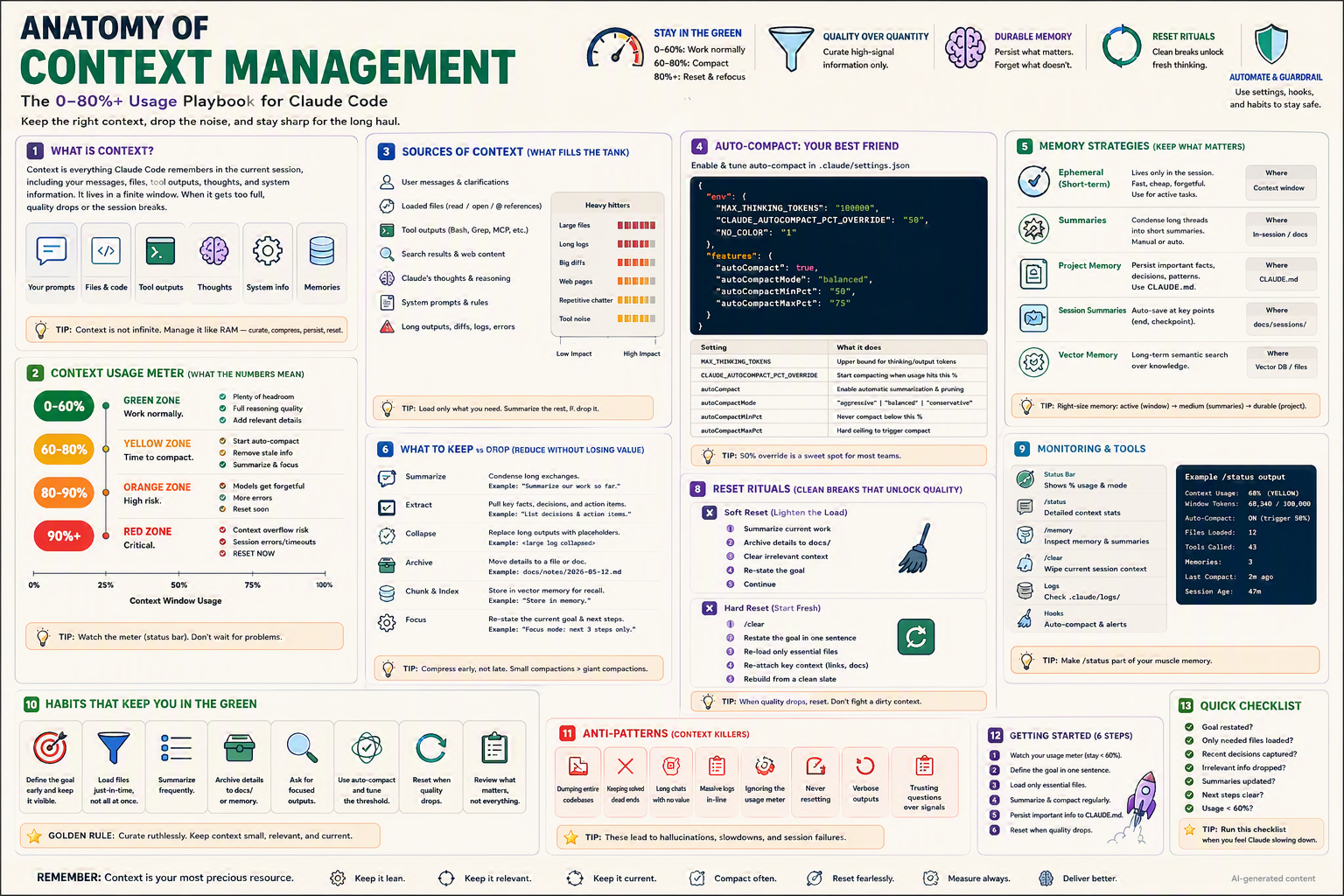
The 0–80%+ usage playbook for Claude Code — auto-compact tuning, memory strategies, and reset rituals that keep your AI teammate sharp.
TL;DR
- Context = everything Claude remembers right now (messages, files, tool outputs, thoughts).
- The window is finite. When it fills, quality drops and the session breaks.
- Watch the meter: 0–60 % work normally · 60–80 % compact · 80 %+ reset.
- Auto-compact is your best friend — tune it in
.claude/settings.json. - Memory strategies: ephemeral, summaries, project (
CLAUDE.md), session, vector. - Reset rituals: soft (compact + summarize) and hard (
/clear+ reload essentials).
Why this matters
Think of context as RAM for your AI teammate. Stuff too much in, and everything slows down, hallucinates, and crashes. Curate it like a senior engineer curates their desk: only what you need, where you need it, when you need it.
Bottom line: Context is your most precious resource. Manage it deliberately.
The Big Picture
Bottom line: Sources fill → meter rises → compact, summarize, or reset.
What Is Context, Really?
Context is the live working memory of the session. It includes:
| Source | What it contains | Impact |
|---|---|---|
| User messages | Your prompts & clarifications | Low–Med |
| Loaded files | Files read or @-referenced | 🔴 High |
| Tool outputs | Bash, Grep, MCP, web fetch | 🔴 High |
| Search results / web | Page content pulled in | 🟠 Med–High |
| Claude's thoughts | Reasoning trace | 🟡 Med |
| System prompts & rules | CLAUDE.md, settings | Low (but always loaded) |
| Long outputs / diffs / logs | Logs, stack traces | 🔴 High |
💡 Tip: Load only what you need. Summarize the rest. Drop irrelevant.
Context Usage Meter — What the Numbers Mean
| Zone | Range | What it means | What to do |
|---|---|---|---|
| 🟢 Green | 0–60 % | Plenty of headroom | Work normally, add details freely |
| 🟡 Yellow | 60–80 % | Time to compact | Start auto-compact, remove stale info |
| 🟠 Orange | 80–90 % | High risk | Models get forgetful, errors creep in |
| 🔴 Red | 90 %+ | Critical | Context overflow risk → RESET NOW |
💡 Tip: Watch the meter in the status bar. Don't wait for problems.
Auto-Compact — Your Best Friend
Auto-compact watches usage and automatically summarizes and prunes older content when thresholds are hit. Tune it in .claude/settings.json:
{
  "env": {
    "MAX_THINKING_TOKENS": "100000",
    "CLAUDE_AUTOCOMPACT_PCT_OVERRIDE": "50",
    "NO_COLOR": "1"
  },
  "features": {
    "autoCompact": true,
    "autoCompactMode": "balanced",
    "autoCompactMinPct": "50",
    "autoCompactMaxPct": "75"
  }
}
Settings reference
| Setting | What it does |
|---|---|
MAX_THINKING_TOKENS | Upper bound for thinking/output tokens |
CLAUDE_AUTOCOMPACT_PCT_OVERRIDE | Start compacting when usage hits this % |
autoCompact | Enable automatic summarization & pruning |
autoCompactMode | aggressive · balanced · conservative |
autoCompactMinPct | Never compact below this % |
autoCompactMaxPct | Hard ceiling that forces compact |
💡 Tip: A 50 % override is the sweet spot for most teams. Aggressive only if you regularly hit 80 %.
Mode trade-offs
| Mode | Pros | Cons |
|---|---|---|
aggressive | Long sessions, low cost | More fidelity loss |
balanced ⭐ | Default recommended | Predictable trade-off |
conservative | Maximum fidelity | Runs out of context faster |
Memory Strategies — Keep What Matters
Different facts deserve different homes:
| Type | What it is | Lifetime | Where |
|---|---|---|---|
| Ephemeral (short-term) | Active task chatter | Session only | Context window |
| Summaries | Condensed long threads | Session or docs | In-session or docs/sessions/ |
| Project memory | Conventions, decisions, patterns | Permanent | CLAUDE.md |
| Session summaries | End-of-session capture | Permanent | docs/sessions/YYYY-MM-DD.md |
| Vector memory | Long-term semantic recall | Permanent | Vector DB or filesystem |
💡 Tip: Right-size memory — active (window) → medium (summaries) → durable (project).
The memory hierarchy in code
┌─────────────────────────────┐
│ ACTIVE CONTEXT (window)     │ ← 0-80% target
├─────────────────────────────┤
│ SESSION SUMMARIES (docs/)   │ ← persisted on /clear
├─────────────────────────────┤
│ CLAUDE.md (project memory)  │ ← always loaded
├─────────────────────────────┤
│ VECTOR DB / search index    │ ← retrieved on demand
└─────────────────────────────┘
What to Keep vs. Drop
Reduce noise without losing value:
| Strategy | When to use | Example |
|---|---|---|
| Summarize | Long exchanges | "Summarize our work so far." |
| Extract | Key facts, decisions, actions | "List decisions & action items." |
| Collapse | Long outputs | Replace with placeholder: <large log collapsed> |
| Archive | Reference later | Move details to docs/notes/2026-05-12.md |
| Chunk & Index | Recall later | Store in vector memory |
| Focus | Narrow scope | "Focus mode: next 3 steps only." |
💡 Tip: Compress early, not late. Small compactions beat giant ones.
Reset Rituals — Clean Breaks That Unlock Quality
Soft Reset (Lighten the Load) — 5 steps
Use when 60–80 %. Keeps the thread alive.
- Summarize current work in one paragraph.
- Archive details to
docs/sessions/<date>.md. - Clear irrelevant context (close files, drop outputs).
- Re-state the goal in one sentence.
- Continue with a leaner window.
Hard Reset (Start Fresh) — 5 steps
Use at 80 %+ or when quality has clearly degraded.
/clear— wipe session.- Restate the goal in one sentence.
- Re-load only essential files.
- Re-attach key context (links to docs, decisions).
- Rebuild from a clean slate.
💡 Tip: When quality drops, reset. Don't fight a dirty context.
Step-by-Step Setup
1. Enable auto-compact in .claude/settings.json
{
  "env": { "CLAUDE_AUTOCOMPACT_PCT_OVERRIDE": "50" },
  "features": {
    "autoCompact": true,
    "autoCompactMode": "balanced",
    "autoCompactMinPct": "50",
    "autoCompactMaxPct": "75"
  }
}
2. Add session-end summarizer hook
"hooks": {
  "SessionEnd": [
    { "matcher": "*",
      "hooks": [{ "type": "command", "command": "./scripts/save-summary.sh" }] }
  ]
}
scripts/save-summary.sh:
#!/usr/bin/env bash
DATE=$(date +%Y-%m-%d)
mkdir -p docs/sessions
echo "# Session $DATE" > "docs/sessions/$DATE.md"
echo "_Auto-saved by Claude Code_" >> "docs/sessions/$DATE.md"
3. Add a /status slash command
.claude/commands/status.md:
---
description: Show current context usage & session stats
usage: /status
---
Report:
- Context usage % and zone (green/yellow/orange/red)
- Window tokens used / total
- Auto-compact state & last compact age
- Files loaded
- Tool calls so far
- Memories active
- Session age
- Suggested next ritual (none / soft / hard reset)
4. Add a /memory slash command
.claude/commands/memory.md:
---
description: Inspect memory & session summaries
usage: /memory
---
Show:
- Active context window items (top consumers)
- Recent session summaries (docs/sessions/)
- Project memory entries (CLAUDE.md)
- Vector memory hits (if enabled)
5. Make /status a muscle-memory habit
Run it every ~10 minutes during long sessions.
Monitoring & Tools
| Tool | Purpose |
|---|---|
| Status bar | Live % usage & mode |
/status | Detailed context stats |
/memory | Inspect memory & summaries |
/clear | Wipe current session context |
Logs (.claude/logs/) | Historical usage trace |
| Hooks | Auto-compact & alerts |
Example /status output
Context Usage: 68% (YELLOW)
Window Tokens: 68,340 / 100,000
Auto-Compact:  ON (trigger 50%)
Files Loaded:  12
Tool Calls:    43
Memories:      3
Last Compact:  2m ago
Session Age:   47m
Next Ritual:   ⚠️  Consider soft reset
Variants for Different Team Settings
👤 Solo developer
Keep it light. autoCompactMode: balanced + /status every 15 min.
{ "features": { "autoCompact": true, "autoCompactMode": "balanced" } }
👥 Small team (2–10)
Standardize session-end summaries so handoffs work.
"hooks": {
  "SessionEnd": [{ "matcher": "*",
    "hooks": [{ "type": "command", "command": "./scripts/save-summary.sh" }] }]
}
Commit docs/sessions/ so the team sees the trail.
🏢 Enterprise / regulated
- Cap costs: lower
MAX_THINKING_TOKENS, setautoCompactMode: aggressive. - Audit memory: log every compact + reset to SIEM.
- PII discipline: never persist sensitive context to disk.
{
  "env": { "MAX_THINKING_TOKENS": "50000", "CLAUDE_AUTOCOMPACT_PCT_OVERRIDE": "40" },
  "features": { "autoCompactMode": "aggressive" }
}
🌍 Open-source / community
- Document the team's context conventions in
CONTRIBUTING.md. - Provide a
/onboardcommand that loads only the essentials. - Use vector memory for the codebase index so context stays lean.
Bottom line: Same playbook, escalating discipline.
Anatomy of a Single Reset — Soft Reset, Zoomed In
Step 1 — Summarize:
  "We refactored auth flow. Tests green. PR open."

Step 2 — Archive:
  Save the summary + key decisions to:
  docs/sessions/2026-06-26.md

Step 3 — Clear:
  Drop loaded files: legacy/auth-old.ts, old logs
  Keep:  src/auth/*.ts, CLAUDE.md

Step 4 — Re-state goal:
  "Ship auth refactor PR #421 by EOD."

Step 5 — Continue:
  Next 3 steps: review feedback, update docs, request review.
Common Patterns & Recipes
Pattern 1 — "Summarize and continue" prompt
Summarize what we've done so far in 5 bullets.
Save decisions to docs/sessions/<date>.md.
Then continue with: <next goal>.
Pattern 2 — Drop heavy artifacts
Drop the contents of legacy/old-service.ts from context.
Replace with: "<archived, see git log>".
Pattern 3 — Focus mode
Focus mode: only consider files under src/auth/.
Ignore tests and docs for the next 3 steps.
Pattern 4 — Auto-compact override mid-session
/config set CLAUDE_AUTOCOMPACT_PCT_OVERRIDE=40
Pattern 5 — Session checkpoint
Checkpoint: save current state, key files, and goal to
docs/sessions/checkpoint-<timestamp>.md so I can resume tomorrow.
Pattern 6 — Vector memory recall
Search project memory for "auth decision rationale 2026".
Load only the top 3 results.
Habits That Keep You in the Green
- 🎯 Define the goal early — and keep it visible.
- 📂 Load files just-in-time — not all at once.
- 📝 Summarize frequently — small > large compactions.
- 🗄️ Archive details to docs/ or memory.
- 🔍 Ask for focused outputs — "the 3 most important issues".
- ⚙️ Use auto-compact and tune the threshold.
- 🔁 Reset when quality drops (don't be stubborn).
- ✅ Review what matters — not everything.
🪙 Golden Rule: Curate ruthlessly. Keep context small, relevant, and current.
Anti-Patterns ❌ (Context Killers)
- 🗑️ Dumping entire codebases into context.
- 💀 Keeping solved threads alive for sentimental reasons.
- 💬 Long chats with no value — every turn is tokens.
- 📜 Massive logs inline — collapse them.
- 🙈 Ignoring the usage meter until it's red.
- 🛑 Never resetting — fighting a dirty context.
- 🗯️ Verbose outputs — ask Claude to be concise.
- 🤔 Trusting questions over signals — believe the meter.
⚠️ These lead to hallucinations, slowdowns, and session failures.
Troubleshooting
| Symptom | Cause | Fix |
|---|---|---|
| Slow responses | Window > 70 % | Compact or soft reset |
| Hallucinations / wrong facts | Stale context | Hard reset + reload essentials |
| Repeating itself | Lost focus | Re-state goal in one sentence |
| Forgets file you mentioned | Auto-compacted it out | Re-attach with @file |
| Cost spike | High MAX_THINKING_TOKENS | Lower cap, enable auto-compact |
| Auto-compact too aggressive | Mode too tight | Switch to balanced |
| Session crashes at 100 % | No auto-compact | Enable + lower threshold |
Quick Checklist (before any long session)
- ✅ Goal restated in one sentence
- ✅ Only needed files loaded
- ✅ Recent decisions captured in
CLAUDE.md - ✅ Irrelevant info dropped
- ✅ Summaries updated
- ✅ Next steps clear
- ✅ Usage < 60 %
💡 Tip: Run this checklist when you feel Claude slowing down.
Getting Started (6 steps)
- Watch your usage meter (stay < 60 %).
- Define the goal in one sentence.
- Load only essential files.
- Summarize & compact regularly.
- Persist important info to
CLAUDE.md. - Reset when quality drops.
Minimal Starter Config
{
  "env": {
    "MAX_THINKING_TOKENS": "100000",
    "CLAUDE_AUTOCOMPACT_PCT_OVERRIDE": "50"
  },
  "features": {
    "autoCompact": true,
    "autoCompactMode": "balanced",
    "autoCompactMinPct": "50",
    "autoCompactMaxPct": "75"
  },
  "hooks": {
    "SessionEnd": [
      { "matcher": "*",
        "hooks": [{ "type": "command", "command": "./scripts/save-summary.sh" }] }
    ]
  }
}
Glossary
- Context window — Total tokens Claude can "see" right now.
- Auto-compact — Automatic summarization to free space.
- Soft reset — Compact + archive + continue.
- Hard reset —
/clear+ reload essentials. - Ephemeral memory — Lives only in the session.
- Project memory — Persisted in
CLAUDE.md. - Vector memory — Semantic search over long-term knowledge.
- Session summary — Compact record of what happened.
- Compaction threshold — The % usage at which auto-compact triggers.
Further Reading
- Search: "Claude Code context window management"
- Search: "LLM context compression techniques"
- Search: "retrieval augmented generation memory strategies"
- Search: "long-running AI agent session design"
🪙 Remember
Context is your most precious resource.
- 🧹 Keep it lean
- 🎯 Keep it relevant
- 📅 Keep it current
- 🔄 Compact often
- 🆕 Reset fearlessly
- 📏 Measure always
- 🚀 Deliver better