Anatomy of Plugins
Plugin anatomy, types, security, and distribution patterns.
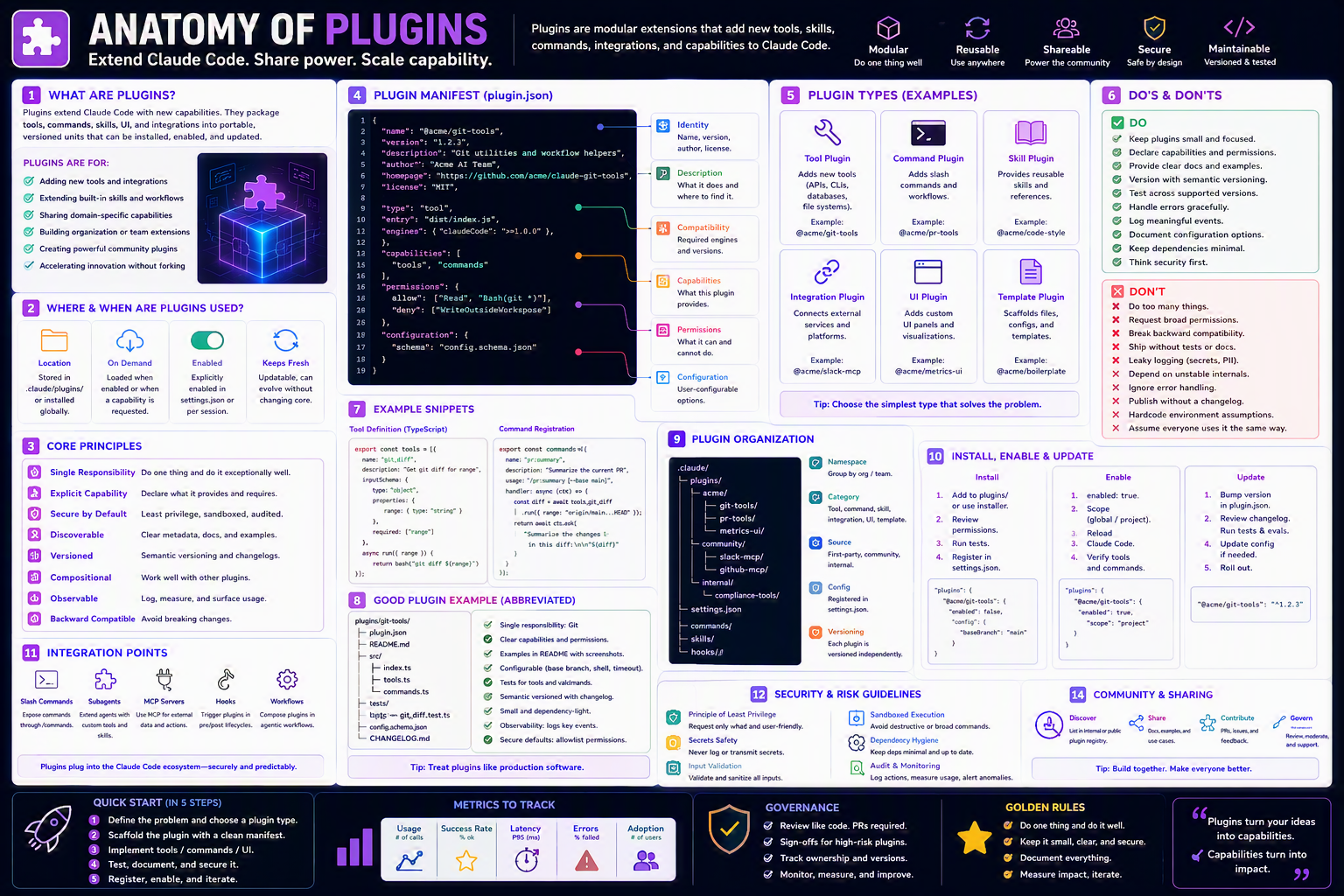
Package, distribute, and standardize your Claude Code superpowers across teams and repos.
TL;DR
- A plugin bundles skills + commands + hooks + agents + templates + docs into one shareable unit.
- Distributed via npm, Git, or your internal registry.
- Versioned with SemVer; installs with one command.
- Best for org-wide standards and community packs.
Why this matters
Plugins are App Store apps for your AI workflow. Instead of every repo reinventing hooks and skills, install a plugin and inherit a proven setup.
Bottom line: Plugins turn local hacks into reusable assets.
The Big Picture
Bottom line: Bundle once, install everywhere.
Plugin Structure
plugins/my-plugin/
├── manifest.json        # Plugin metadata
├── README.md            # Overview & setup
├── skills/
│   └── code-review/     # Bundled skills
├── commands/
│   └── review.md        # Slash commands
├── hooks/
│   ├── pre-tool.sh
│   └── post-tool.sh     # Hook scripts
├── agents/
│   └── code-reviewer.yml
├── templates/
│   └── pr-template.md
└── scripts/
    ├── install.sh
    ├── post-install.sh
    └── uninstall.sh
manifest.json Example
{
  "name": "acme-dev-tools",
  "version": "1.2.0",
  "description": "Essential dev tools for Claude Code at Acme",
  "author": "Acme Engineering",
  "license": "MIT",
  "category": "developer-tools",
  "dependencies": {
    "claude-code": ">=0.6.0"
  },
  "includes": {
    "skills":   ["code-review", "test-writer"],
    "commands": ["review", "deploy"],
    "hooks":    ["pre-tool", "post-tool"],
    "agents":   ["code-reviewer"]
  },
  "hooks": {
    "install":   "./scripts/install.sh",
    "post_install": "./scripts/post-install.sh",
    "uninstall": "./scripts/uninstall.sh"
  }
}
Step-by-Step Setup
1. Scaffold the plugin
mkdir -p plugins/my-plugin/{skills,commands,hooks,agents,templates,scripts}
touch plugins/my-plugin/{manifest.json,README.md}
2. Write manifest.json (see example above)
3. Add the install script
cat > plugins/my-plugin/scripts/install.sh <<'EOF'
#!/usr/bin/env bash
echo "Installing my-plugin..."
mkdir -p .claude/commands
cp -r commands/* .claude/commands/
chmod +x hooks/*.sh
echo "✅ Done!"
EOF
chmod +x plugins/my-plugin/scripts/install.sh
4. Publish (one of):
# npm
npm publish

# Private Git registry
git tag v1.2.0 && git push --tags
5. Install in another repo
claude plugin install acme-dev-tools
Variants for Different Team Settings
👤 Solo
Keep plugins as local folders; no publishing needed.
👥 Small team
Host on a private GitHub repo + tag releases.
claude plugin install github:acme/my-plugin#v1.2.0
🏢 Enterprise
- Private npm registry (Verdaccio / Artifactory).
- Sign packages & verify SHA before install.
- Pin versions in every repo's
.claude/plugins.json. - Run plugin install in CI to catch drift.
🌍 Open-source
- Publish on npm with clear README.
- Provide a demo repo showing usage.
- Use SemVer; document breaking changes.
Bottom line: Same package, escalating distribution rigor.
Publishing Checklist
- ✅
manifest.jsonis valid - ✅
README.mdwith clear setup - ✅ No secrets in any file
- ✅ All paths are relative
- ✅ Version follows SemVer
- ✅ License included
- ✅ Tested in clean environment
Example: Simple Plugin (skeleton)
my-plugin/
├── manifest.json
├── README.md
├── commands/
│   └── review.md
├── hooks/
│   └── pre-tool.sh
└── scripts/
    └── install.sh
scripts/install.sh:
#!/usr/bin/env bash
echo "Installing my-plugin..."
mkdir -p .claude/commands
cp -r commands/* .claude/commands/
chmod +x hooks/*.sh
echo "✅ Done!"
Common Plugin Use Cases
| Use case | What it bundles |
|---|---|
| Team standards | Shared CLAUDE.md, hooks, conventions |
| Security guardrails | Pre-commit secret scans, audit hooks |
| Automation pipelines | CI/CD scripts, deploy commands |
| Domain workflows | E.g. healthcare HIPAA checks |
| Starter kits / templates | Boilerplate for a new service |
| Organization toolbox | Catch-all of common helpers |
Common Patterns & Recipes
Pattern 1 — Idempotent install
[ -d .claude/commands ] || mkdir -p .claude/commands
cp -n commands/* .claude/commands/    # -n = no clobber
Pattern 2 — Plugin with auto-update
"hooks": { "update": "./scripts/update.sh" }
Pattern 3 — Plugin composition
"dependencies": {
  "@acme/security-pack": "^1.0.0",
  "@acme/devops-pack":   "^2.0.0"
}
Pattern 4 — Uninstall safely
rm -rf .claude/commands/{review,deploy}.md
echo "✅ Cleaned up."
Best Practices ✅
- Bundle only what you need.
- Pin compatible versions.
- Make install idempotent.
- Document everything.
- Test in a clean environment before publishing.
- SemVer religiously.
Anti-Patterns ❌
- Plugins that silently overwrite user files.
- Hard-coded absolute paths.
- Secrets baked into the manifest.
- No uninstall script.
- Mixing unrelated capabilities into one "kitchen-sink" plugin.
Troubleshooting
| Symptom | Cause | Fix |
|---|---|---|
| Install fails | Missing dependency | Check manifest.json deps |
| Files not appearing | Wrong relative path | Use ./ everywhere |
| Conflicts with existing config | No conflict check | Use cp -n or merge logic |
| Breaks on update | Non-SemVer bump | Tag a major version |
| Can't uninstall | No uninstall.sh | Add one; list every file created |
Starter Template
{
  "name": "my-plugin",
  "version": "0.1.0",
  "description": "What it does",
  "includes": { "skills": [], "commands": [], "hooks": [] },
  "hooks": { "install": "./scripts/install.sh" }
}
💡 Tip: Ship value fast. Iterate based on adoption.
Glossary
- Plugin — A bundled, distributable Claude Code extension.
- Manifest —
manifest.jsondescribing the plugin. - SemVer — Semantic Versioning (
MAJOR.MINOR.PATCH). - Idempotent — Safe to run multiple times with same result.
Further Reading
- Search: "Claude Code plugins documentation"
- Search: "npm publish private registry"
- Search: "SemVer specification"