Anatomy of Prompt Engineering for Repos
System prompts, few-shots, CLAUDE.md interplay, and design patterns.
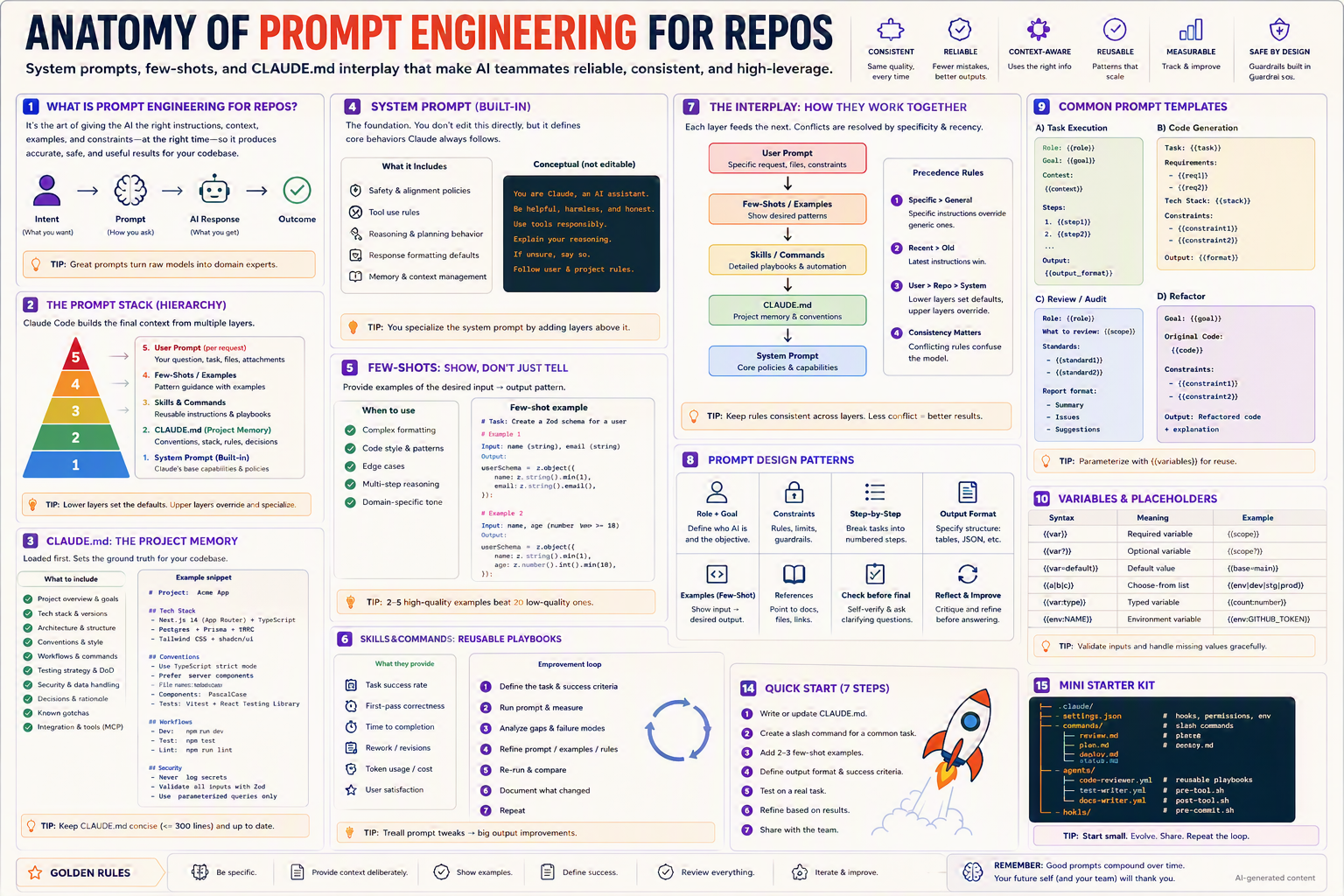
System prompts, few-shots, and
CLAUDE.mdinterplay — the art of giving AI the right context, at the right time, to produce reliable results across your codebase.
TL;DR
- Prompt engineering for repos isn't writing one clever prompt — it's layering context across the stack.
- The hierarchy: System Prompt →
CLAUDE.md→ Skills/Commands → Few-Shots → User Prompt. - Lower layers set defaults; upper layers override and specialize.
- Few-shots beat instructions for nuanced behavior — show, don't just tell.
- Keep rules consistent across layers. Less conflict = better results.
Why this matters
A great prompt for a one-off task is a clever trick. A great prompt system for a repo is leverage that compounds — every team member, every session, every PR benefits.
Bottom line: Prompt engineering at the repo level turns a raw model into a domain expert your team can trust.
The Big Picture — The Prompt Stack
Bottom line: Five layers. Each one feeds the next. Most teams only think about layer 5.
The Five Layers (top of stack = highest specificity)
| # | Layer | What it sets | Who owns it |
|---|---|---|---|
| 5 | User Prompt | The specific ask | The person at the keyboard |
| 4 | Few-Shots / Examples | Patterns to emulate | Skill / command author |
| 3 | Skills / Commands | Reusable instructions | Team |
| 2 | CLAUDE.md | Project memory, conventions | Repo maintainers |
| 1 | System Prompt | Base capabilities & safety | Anthropic |
💡 Tip: Lower layers set the defaults. Upper layers override and specialize.
Layer 1 — System Prompt (Built-in)
You don't edit this directly, but it defines core behaviors Claude always follows.
What it includes
- 🛡️ Safety & alignment policies
- 🔧 Tool use rules
- 🧠 Reasoning & planning behavior
- ✍️ Response formatting defaults
- 🧰 Memory & context management
Conceptual (not editable)
You are Claude, an AI assistant.
Be helpful, harmless, and honest.
Use tools responsibly.
Explain your reasoning.
If unsure, say so.
Follow user & project rules.
💡 Tip: You specialize the system prompt by adding layers above it, not by fighting it.
Layer 2 — CLAUDE.md (Project Memory)
Loaded first. Sets the ground truth for your codebase. (See the dedicated Anatomy of CLAUDE.md for the full spec.)
What to include
- ✅ Project overview & goals
- ✅ Tech stack & versions
- ✅ Architecture & structure
- ✅ Conventions & style
- ✅ Workflows & commands
- ✅ Testing strategy & DoD
- ✅ Security & data handling
- ✅ Decisions & rationale
- ✅ Known gotchas
- ✅ Integration & tools (MCP)
Example skeleton
# Project: Acme App

## Tech Stack
- Next.js 14 (App Router) · TypeScript
- Postgres · Prisma · tRPC
- Tailwind CSS · shadcn/ui

## Conventions
- Use TypeScript strict mode.
- Prefer server components.
- File names: kebab-case. Components: PascalCase.
- Tests: Vitest + React Testing Library.

## Workflows
- Dev:  npm run dev
- Test: npm test
- Lint: npm run lint

## Security
- Never log secrets.
- Validate all inputs with Zod.
- Use parameterized queries only.
💡 Tip: Keep
CLAUDE.mdconcise (≤ 300 lines) and up to date. Reference, don't repeat.
Layer 3 — Skills & Commands (Reusable Playbooks)
These encode repeatable workflows so the team doesn't reinvent them each session. (See the Skills and Slash Commands anatomies for full detail.)
What they provide
- 📈 Task success rate
- 🎯 First-pass correctness
- ⏱️ Time to completion
- 🔁 Rework / revisions
- 💰 Token usage / cost
- 😊 User satisfaction
Improvement loop
- Define the task & success criteria.
- Run prompt & measure.
- Analyze gaps & failure modes.
- Refine prompt / examples / rules.
- Re-run & compare.
- Document what changed.
- Repeat.
💡 Tip: Treat prompt tweaks like code changes — review, version, and measure.
Layer 4 — Few-Shots: Show, Don't Just Tell
Examples teach faster than rules. For tricky formats, 2–5 high-quality examples beat 20 low-quality ones.
When to use few-shots
- ✅ Complex formatting
- ✅ Code style & patterns
- ✅ Edge cases
- ✅ Multi-step reasoning
- ✅ Domain-specific tone
Few-shot example
# Task: Create a Zod schema for a user

# Example 1
Input:  name (string), email (string)
Output:
userSchema = z.object({
  name:  z.string().min(1),
  email: z.string().email(),
});

# Example 2
Input: name, age (number where >= 18)
Output:
userSchema = z.object({
  name: z.string().min(1),
  age:  z.number().int().min(18),
});

# Now do:
Input: name, email, role (enum: admin | user | guest)
💡 Tip: Order examples from simple → complex. The last example shapes behavior most.
Layer 5 — User Prompt (The Specific Ask)
This is where the magic — or the chaos — happens. The other four layers exist to make this layer short, specific, and effective.
A great user prompt
- States the role (when useful): "Act as a senior reviewer."
- States the goal in one sentence.
- Gives constraints (must / must not).
- References files (
@src/auth/login.ts). - Asks for a specific output format.
Anti-prompt → Better
❌ "Fix the bug"
✅ "Act as a senior backend engineer. The /login endpoint
   returns 500 for valid creds (logs attached). Find the
   root cause and propose a minimal fix with a test.
   Output: 1) root cause, 2) patch (diff), 3) test."
The Interplay — How They Work Together
Each layer feeds the next. Conflicts are resolved by specificity and recency.
Precedence rules
- Specific > General — Specific instructions override generic ones.
- Recent > Old — Latest instructions in the conversation win.
- User > Repo > System — Lower layers set defaults; upper layers override.
- Consistency matters — Conflicting rules confuse the model.
💡 Tip: Keep rules consistent across layers. Less conflict = better results.
Prompt Design Patterns
| Pattern | What it does |
|---|---|
| 🎭 Role + Goal | Define who AI is and the objective |
| 🛡️ Constraints | Rules, limits, guardrails |
| 🪜 Step-by-Step | Break tasks into numbered steps |
| 📋 Output Format | Specify structure: tables, JSON, etc. |
| 💡 Examples (Few-Shot) | Show input → desired output |
| 📚 References | Point to docs, files, links |
| ✅ Check Before Final | Self-verify & ask clarifying questions |
| 🔁 Reflect & Improve | Critique and refine before answering |
Common Prompt Templates
A) Task Execution
Role: {{role}}
Goal: {{goal}}

Context: {{context}}

Steps:
1. {{step1}}
2. {{step2}}
...

Output: {{output_format}}
B) Code Generation
Task: {{task}}

Requirements:
- {{req1}}
- {{req2}}

Tech stack: {{stack}}

Constraints:
- {{constraint1}}
- {{constraint2}}

Output: {{format}}
C) Review / Audit
Role: {{role}}
What to review: {{scope}}

Standards:
- {{standard1}}
- {{standard2}}

Report format:
- Summary
- Issues (Critical / Medium / Low)
- Suggestions (file:line)
D) Refactor
Goal: {{goal}}

Original code:
{{code}}

Constraints:
- {{constraint1}}
- {{constraint2}}

Output: Refactored code + brief explanation of changes.
💡 Tip: Parameterize with
{{variables}}for reuse across slash commands and skills.
Variables & Placeholders
| Syntax | Meaning | Example |
|---|---|---|
{{var}} | Required variable | {{scope}} |
{{var?}} | Optional variable | {{scope?}} |
{{var=default}} | Default value | {{base=main}} |
{{a|b|c}} | Choose-from list | {{env|dev|stg|prod}} |
{{var:type}} | Typed variable | {{count:number}} |
{{env:NAME}} | Environment variable | {{env:GITHUB_TOKEN}} |
💡 Tip: Validate inputs and handle missing values gracefully — never assume the caller filled them in.
Step-by-Step Setup
1. Write or update CLAUDE.md
Start with the skeleton above. Keep it crisp.
2. Create a slash command for a common task
.claude/commands/review.md:
---
description: Review the current branch
arguments:
  - name: base
    default: main
permissions:
  allow: ["Read", "Bash(git *)"]
---
Act as a senior reviewer. Diff vs `{{base}}`.
Report: Risks (Critical/Medium/Low) · Missing tests · Suggestions (file:line).
Follow conventions in CLAUDE.md.

# Example output format
## Risks
- 🔴 SQL injection in src/users.ts:42
- 🟡 Missing null check in src/auth.ts:91

## Missing tests
- /login with invalid creds

## Suggestions
- Parameterize the query in src/users.ts:42
3. Add 2–3 few-shot examples
Inline in the command, or in references/ of a skill.
4. Define output format & success criteria
Be explicit: bullet points, headings, code blocks, JSON, etc.
5. Test on a real task
Run, observe, capture failure modes.
6. Refine based on results
Tighten constraints; add/remove examples.
7. Share with the team
Commit, demo, document the why.
Variants for Different Team Settings
👤 Solo developer
- Minimal
CLAUDE.md(≤ 100 lines). - 1–2 slash commands.
- Personal style baked into prompts.
👥 Small team (2–10)
- Shared
CLAUDE.md+ shared.claude/commands/. - Conventional commits, PR template referencing
/review. - One few-shot library in
docs/examples/.
🏢 Enterprise / regulated
- Pin model versions.
- Approved prompt templates committed and code-reviewed.
- Audit hooks log prompt + response hashes.
- Inject compliance reminders via layer 2/3 (
CLAUDE.md+ skills).
🌍 Open-source / community
- Generic, jargon-free prompts.
- Contribution guide for new commands & few-shots.
- Examples for the most common contributor tasks (file an issue, open a PR, write a test).
Bottom line: Same stack, escalating governance.
Common Patterns & Recipes
Pattern 1 — Self-check
Before finalizing, list any assumptions you made.
Re-check each assumption against CLAUDE.md.
If any conflict, ask before proceeding.
Pattern 2 — Clarifying question gate
If the task is ambiguous, ask up to 3 clarifying questions
BEFORE writing code. Otherwise, proceed.
Pattern 3 — Output in two passes
Pass 1: Write the code.
Pass 2: Critique your own code as a senior reviewer.
Pass 3: Apply fixes from your critique.
Pattern 4 — Constrained format
Return ONLY this JSON:
{
  "summary": string,
  "risks": [{"level": "critical|medium|low", "file": string, "line": number, "note": string}],
  "tests_missing": string[]
}
Pattern 5 — Anchor with references
Read CLAUDE.md and docs/architecture.md before answering.
Cite the section you're following in your response.
Pattern 6 — Anti-hallucination
If you don't know, say "I don't know" and propose
how to find out (a test, a doc to read, a person to ask).
Best Practices ✅
- Be specific & concrete — vague prompts → vague outputs.
- Provide context deliberately — load what's needed, no more.
- Show examples — few-shots are gold.
- Define success criteria — what does "done" look like?
- Review everything — AI is fast, not infallible.
- Iterate weekly — prompts are code; refactor them.
- Keep layers consistent — no contradictions between
CLAUDE.mdand a command.
Anti-Patterns ❌
- 🗯️ Walls of vague instructions.
- 🤖 "Just be smart" prompts.
- 🥪 Stacking 20 examples (more isn't better).
- 🎭 Contradictory rules across layers.
- 🙈 No output format → unpredictable parsing.
- ❓ No clarifying-question option.
- 📜 Mega prompts that ignore
CLAUDE.md.
Troubleshooting
| Symptom | Cause | Fix |
|---|---|---|
| Output ignores conventions | CLAUDE.md too long / vague | Trim to bullets, add examples |
| Wrong format | No format spec | Provide explicit format + 1 example |
| Hallucinated APIs | No grounding | Reference docs; add anti-hallucination rule |
| Inconsistent style | Conflicting layers | Audit & align rules across layers |
| Repeats itself | No constraints | Add length caps & "no repetition" rule |
| Skips safety checks | Few-shots show bad patterns | Replace examples with good patterns |
| Over-cautious | Too many constraints | Trim guardrails; allow proposal mode |
Mini Starter Kit
.claude/
├── settings.json        # hooks, permissions, env
├── commands/
│   ├── review.md        # slash commands
│   ├── plan.md
│   ├── deploy.md
│   └── status.md
agents/
├── code-reviewer.yml    # reusable playbooks
├── test-writer.yml
└── docs-writer.yml
hooks/
├── pre-tool.sh
├── post-tool.sh
└── pre-commit.sh
CLAUDE.md                # project memory (layer 2)
docs/
└── examples/            # few-shot library
💡 Tip: Start small. Evolve. Share. Repeat the loop.
Quick Start (7 steps)
- Write or update
CLAUDE.mdwith stack, conventions, security. - Create a slash command for one common task (e.g.,
/review). - Add 2–3 few-shot examples to that command.
- Define output format & success criteria.
- Test on a real task.
- Refine based on results.
- Share with the team — commit + demo + document.
Glossary
- System prompt — Anthropic-built base instructions; not user-editable.
CLAUDE.md— Project-level memory & conventions (layer 2).- Skill / Command — Reusable playbook (layer 3).
- Few-shot — Examples that demonstrate desired input → output.
- Zero-shot — Prompt with no examples (relies on layers 1–3 + 5).
- Chain-of-thought — Encouraging the model to reason step-by-step.
- Role prompting — "Act as a senior reviewer" — sets persona/context.
- Output format — Explicit structure for the response.
- Self-critique / reflection — Asking the model to evaluate its own output.
Further Reading
- Search: "Anthropic prompt engineering guide"
- Search: "few-shot vs zero-shot LLM examples"
- Search: "prompt patterns catalog 2026"
- Search: "prompt versioning & evaluation"
🪙 Golden Rules
- 🎯 Be specific.
- 📂 Provide context deliberately.
- 💡 Show examples.
- ✅ Define success.
- 🔍 Review everything.
- 🔁 Iterate & improve.
Remember: Good prompts compound over time. Your future self (and your team) will thank you.