Anatomy of AI-Powered Dev Loop
Daily/weekly rhythms (plan → pair → review → retro) for AI-augmented teams.
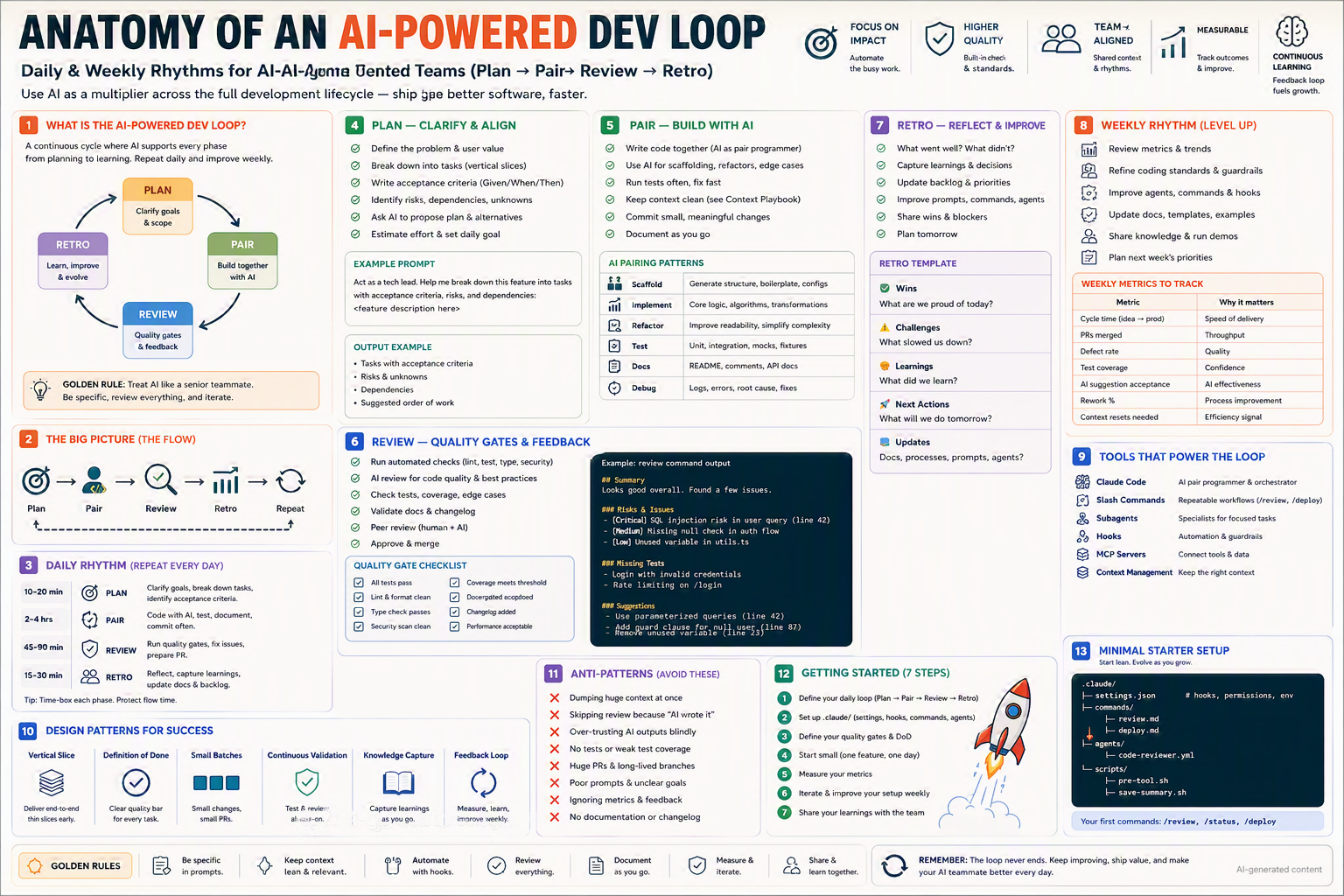
Daily & weekly rhythms for AI-augmented teams — Plan → Pair → Review → Retro — to ship better software, faster, together.
TL;DR
- The AI-powered dev loop has four phases: Plan · Pair · Review · Retro.
- Run the full loop every day at small scale; every week at larger scale.
- Use AI as a multiplier, not a replacement: clarify intent, generate options, accelerate execution, raise the quality bar.
- Treat AI like a senior teammate — give it context, review everything, iterate.
- The loop's job is continuous learning: every retro improves the next plan.
Why this matters
Most teams have tools but no rhythm. They adopt AI ad hoc — one engineer uses it brilliantly, the rest don't. A loop turns AI into a team practice: same cadence, same artifacts, same feedback signals. That's how AI moves from "neat trick" to "compound advantage."
Bottom line: Without rhythm, AI is a toy. With rhythm, AI is a multiplier.
The Big Picture
Bottom line: Four phases. One loop. Daily inside, weekly outside.
The Four Phases
| Phase | Purpose | AI's role | Output |
|---|---|---|---|
| 🎯 Plan | Clarify goals & scope | Brainstorm, decompose, propose alternatives | Tasks with acceptance criteria |
| 🤝 Pair | Build together | Pair programmer: scaffold, refactor, test | Working code + tests |
| 🔍 Review | Quality gates | Reviewer: lint, tests, risk analysis | Approved (or fixed) PR |
| 🔁 Retro | Learn & improve | Coach: surface signals, suggest tweaks | Updated playbook |
1. Plan — Clarify & Align
Goal: Convert intent into well-formed tasks before any code is written.
Checklist
- ✅ Define the problem & user value
- ✅ Break down into tasks (vertical slices)
- ✅ Write acceptance criteria (Given / When / Then)
- ✅ Identify risks, dependencies, unknowns
- ✅ Ask AI to propose plan & alternatives
- ✅ Estimate effort & set the daily goal
Example prompt
Act as a tech lead. Help me break down this feature into tasks
with acceptance criteria, risks, and dependencies:

<feature description here>

Return:
1. Tasks (≤4 hours each), vertical slices.
2. Acceptance criteria per task (Given/When/Then).
3. Risks & unknowns to investigate first.
4. Suggested order of work + critical path.
Output example
Tasks (vertical slices, ≤4 hrs each):
1. [auth] Magic-link request endpoint
   AC: Given anonymous, When POST /auth/magic, Then 200 + email queued
2. [auth] Magic-link verify endpoint
3. [auth] Session cookie issued
4. [ui] Login page redirect after verify

Risks & unknowns:
- Email deliverability in regions X, Y
- Token TTL strategy (15 min vs 1 hr)

Dependencies:
- SendGrid sandbox creds
- JWT signing key rotation policy

Suggested order: 2 → 1 → 3 → 4 (de-risk verify first)
💡 Tip: A good Plan is one where you could hand the tasks to any teammate (or any AI session) and they'd ship the right thing.
2. Pair — Build with AI
Goal: Write code together with AI as a pair programmer, not a vending machine.
Checklist
- ✅ Write code together (AI as pair, you as driver)
- ✅ Use AI for scaffolding, refactors, edge cases
- ✅ Run tests often, fix fast
- ✅ Keep context clean (see Context Management playbook)
- ✅ Commit small, meaningful changes
- ✅ Document as you go
AI pairing patterns
| Pattern | Use AI to… |
|---|---|
| 🏗️ Scaffold | Generate structure, boilerplate, configs |
| 🛠️ Implement | Core logic, algorithms, transformations |
| 🔄 Refactor | Improve readability, simplify complexity |
| 🧪 Test | Unit, integration, mocks, fixtures |
| 📚 Docs | README, comments, API docs |
| 🐞 Debug | Logs, errors, root cause, fixes |
Example daily pairing session
You:   "Implement task #2 — magic-link request endpoint.
       Use Zod for input validation. Tests first."
AI:    [proposes test cases + implementation plan]
You:   "Tests look good. Generate them. Then implement."
AI:    [writes tests, then implementation]
You:   "Run npm test."
AI:    [runs, reports green]
You:   "Commit as: feat(auth): magic-link request endpoint"
💡 Tip: Your job in Pair mode is driver + reviewer, not stenographer. Read every line.
3. Review — Quality Gates & Feedback
Goal: Verify quality before merge. Use AI to augment, not replace, human review.
Checklist
- ✅ Run automated checks (lint, test, type, security)
- ✅ AI review for code quality & best practices
- ✅ Check tests, coverage, edge cases
- ✅ Validate docs & changelog
- ✅ Peer review (human + AI)
- ✅ Approve & merge
Quality gate checklist
| Gate | ✅ Pass criteria |
|---|---|
| All tests pass | CI green |
| Lint & format clean | Zero warnings |
| Type check passes | Zero errors |
| Security scan clean | No high/critical findings |
| Coverage meets threshold | ≥ team baseline (e.g. 80%) |
| Docs updated | README / API docs / changelog |
| Changelog added | Conventional entry |
| Performance acceptable | No regression |
Example /review output
## Summary
Looks good overall. Found a few issues.

### Risks & Issues
- 🔴 **Critical:** SQL injection risk in user query (line 42)
- 🟡 **Medium:** Missing null check in auth flow
- 🟢 **Low:** Unused variable in utils.ts

### Missing Tests
- Login with invalid credentials
- Rate limiting on /login

### Suggestions
- Use parameterized queries (line 42)
- Add guard clause for null user (line 87)
- Remove unused variable (line 23)
💡 Tip: Pair the AI review with at least one human reviewer for anything that touches money, auth, or data.
4. Retro — Reflect & Improve
Goal: Close the loop. Capture wins, blockers, learnings → improve tomorrow.
Daily mini-retro (15 min) — template
# Daily Retro — 2026-06-26

## ✅ Wins
- What are we proud of today?

## ⚠️ Challenges
- What slowed us down?

## 💡 Learnings
- What did we learn? (about the system, the prompts, the workflow)

## 🎯 Next Actions
- What will we do tomorrow?

## 📝 Updates
- Docs, processes, prompts, agents to change?
Checklist
- ✅ What went well? What didn't?
- ✅ Capture learnings & decisions
- ✅ Update backlog & priorities
- ✅ Improve prompts, commands, agents based on what you saw
- ✅ Share wins & blockers with the team
- ✅ Plan tomorrow
💡 Tip: A retro that doesn't change at least one thing is a retro that didn't happen.
Daily Rhythm — Repeat Every Day
| Time | Phase | Activities |
|---|---|---|
| 10–20 min | 🎯 Plan | Clarify goals, break down tasks, identify acceptance criteria |
| 2–4 hrs | 🤝 Pair | Code with AI, test, document, commit often |
| 45–90 min | 🔍 Review | Run quality gates, fix issues, prepare PR |
| 15–30 min | 🔁 Retro | Reflect, capture learnings, update docs & backlog |
💡 Tip: Time-box each phase. Protect flow time. Don't let Review eat Plan.
Weekly Rhythm — Level Up
The daily loop ships features. The weekly loop raises the team's ceiling.
Weekly checklist
- ✅ Review metrics & trends
- ✅ Refine coding standards & guardrails
- ✅ Improve agents, commands, hooks (your AI fleet)
- ✅ Update docs, templates, examples
- ✅ Share knowledge & run demos
- ✅ Plan next week's priorities
Weekly metrics to track
| Metric | Why it matters |
|---|---|
| Cycle time (idea → prod) | Speed of delivery |
| PRs merged | Throughput |
| Defect rate | Quality |
| Test coverage | Confidence |
| AI suggestion acceptance | AI effectiveness |
| Rework % | Process improvement |
| Context resets needed | Efficiency signal |
💡 Tip: Pick 3 metrics max for any quarter. Tracking everything tracks nothing.
Tools That Power the Loop
| Tool | Role |
|---|---|
| Claude Code | AI pair programmer & orchestrator |
| Slash commands | Repeatable workflows (/review, /deploy) |
| Subagents | Specialists for focused tasks |
| Hooks | Automation & guardrails |
| MCP servers | Connect tools & data |
| Context management | Keep the right context |
Each one has its own anatomy in this library — use them together as a coherent system.
Variants for Different Team Settings
👤 Solo developer
- Cadence: Daily loop = 1 morning ritual. Weekly = Friday 30-min retro.
- Stack:
/plan,/review,/deployslash commands. - Metrics: 2 max (cycle time, AI acceptance).
👥 Small team (2–10)
- Cadence: Daily standup includes a "Plan + AI" segment. Weekly demo every Friday.
- Stack: Shared
.claude/commands/, sharedCLAUDE.md, code-reviewer subagent. - Metrics: PR throughput, defect rate, AI suggestion acceptance.
🏢 Enterprise / regulated
- Cadence: Sprint-aligned. Daily loops inside sprints. Sprint retros capture AI signals.
- Stack: Org-wide plugin packs. Audit hooks on every tool call. Human gate before prod.
- Metrics: Cycle time, escaped defects, audit findings, AI policy violations.
🌍 Open-source / community
- Cadence: Weekly maintainer sync. Async daily.
- Stack: Public
agents/, contributor/onboardcommand, AI-assisted triage. - Metrics: First-response time, time-to-merge, contributor activation.
Bottom line: Same loop, different drum.
Design Patterns for Success
🗂️ Vertical Slice
Deliver end-to-end thin slices early (UI → API → DB) instead of horizontal layers.
✅ Definition of Done (DoD)
A clear, shared bar for "done" — tests + docs + changelog + monitoring.
📦 Small Batches
Small changes, small PRs. Easier to review, easier to revert.
🔁 Continuous Validation
Test & review all-day, not at the end of the week.
📚 Knowledge Capture
Capture learnings as you go — CLAUDE.md, session summaries, retros.
📈 Feedback Loop
Measure, learn, improve weekly. The loop never ends.
Step-by-Step Setup
1. Define your daily loop
- Phases, time-boxes, owners.
- Document in
docs/dev-loop.md.
2. Set up .claude/
settings.jsonwith permissions + hooks.commands/review.md,commands/deploy.md,commands/plan.md,commands/retro.md.agents/code-reviewer.yml.
3. Define quality gates & DoD
- Codify in
CLAUDE.mdunder## Definition of Done.
4. Start small (one feature, one day)
- Run the loop end-to-end on a tiny slice. Note friction.
5. Measure your metrics
- Pick 2–3. Track weekly.
6. Iterate & improve your setup weekly
- Tune prompts, agents, hooks. Document what changed and why.
7. Share your learnings with the team
- Lunch-and-learn, demo, internal blog.
Anti-Patterns ❌ (Avoid These)
- 🗑️ Dumping huge context at once instead of curating.
- 🙈 Skipping review because "AI wrote it."
- 🤖 Over-trusting AI outputs blindly.
- 🧪 No tests or weak test coverage.
- 🐘 Huge PRs & long-lived branches.
- 😶 Poor prompts & unclear goals.
- 📉 Ignoring metrics & feedback.
- 📜 No documentation or changelog.
Troubleshooting
| Symptom | Cause | Fix |
|---|---|---|
| Loop feels slow | Phases run too long | Tighter time-boxes |
| AI suggestions ignored | Poor prompts / no DoD | Improve prompts, codify DoD |
| Quality drops | Skipping Review | Make /review mandatory in PR template |
| Reviews take forever | PRs too big | Smaller batches, vertical slices |
| Retros are noise | No actions tracked | Convert each insight to a backlog item |
| Team disengaged | Top-down loop | Co-design with the team, iterate |
| Metrics gamed | Too many metrics | Pick 2–3 outcome metrics |
Minimal Starter Setup
.claude/
├── settings.json        # hooks, permissions, env
├── commands/
│   ├── plan.md
│   ├── review.md
│   ├── retro.md
│   └── deploy.md
agents/
└── code-reviewer.yml
scripts/
├── pre-tool.sh
└── save-summary.sh
docs/
├── dev-loop.md          # the loop itself, documented
└── sessions/            # auto-saved session summaries
Your first commands:
/plan       — clarify goals & decompose
/review     — run quality gates
/retro      — capture wins, blockers, learnings
/deploy     — ship safely
💡 Tip: Start lean. Evolve as you grow.
Getting Started (7 steps)
- Define your daily loop (Plan → Pair → Review → Retro).
- Set up
.claude/(settings, hooks, commands, agents). - Define your quality gates & DoD.
- Start small — one feature, one day.
- Measure your metrics — pick 2–3.
- Iterate & improve your setup weekly.
- Share your learnings with the team.
Glossary
- Dev loop — The recurring cycle a team uses to plan, build, review, and improve.
- Pair programming — Two collaborators (human + AI) building together.
- Definition of Done (DoD) — Shared bar for what "complete" means.
- Quality gate — A check that must pass before code progresses.
- Vertical slice — End-to-end thin slice that touches all layers.
- Retro (retrospective) — Structured reflection to improve the next cycle.
- Cycle time — Time from idea to production.
- AI suggestion acceptance — % of AI proposals adopted (signal of AI fit).
Further Reading
- Search: "continuous delivery dev loop best practices"
- Search: "agile retrospectives techniques"
- Search: "AI-augmented engineering productivity metrics"
- Search: "definition of done examples software"
🪙 Golden Rules
- 🧭 Be specific in prompts — context is leverage.
- 🧹 Keep context lean & relevant.
- ⚙️ Automate with hooks — let the loop run itself where it can.
- 👀 Review everything — AI makes great suggestions, not great commits.
- 📝 Document as you go — future-you needs the trail.
- 📊 Measure & iterate — what gets measured improves.
- 🤝 Share & learn together — AI advantage compounds in teams.
Remember: The loop never ends. Keep improving, ship value, and make your AI teammate better every day.