Anatomy of Subagents
Specialized subagents, patterns, orchestration, and best practices.
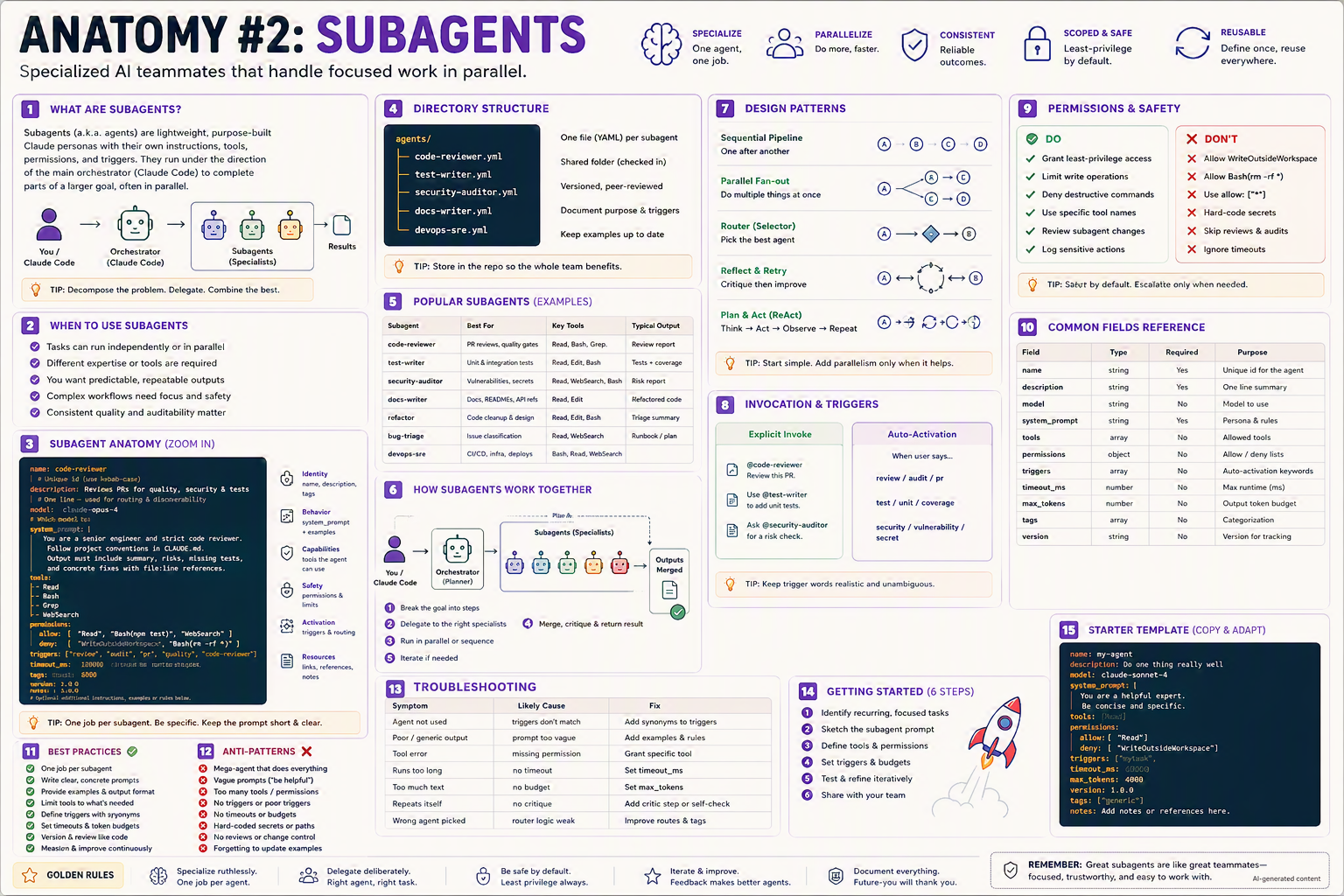
Specialized AI teammates that handle focused work in parallel — so your main agent stays sharp and your team ships faster.
TL;DR
- A subagent (a.k.a. agent) is a lightweight, purpose-built Claude persona with its own prompt, tools, permissions, and triggers.
- They run under the main orchestrator (Claude Code) to complete parts of a larger goal — sequentially or in parallel.
- Defined as one YAML file per agent under
agents/. - Best when each subagent does one job, really well.
- Right governance turns them from "neat demo" into auditable, reusable teammates.
Why this matters
Think of a film set. Instead of one person doing direction, lighting, sound, and editing, you hire specialists. Subagents are your AI film crew — each focused, predictable, and replaceable.
Bottom line: Specialization beats genius generalists. Decompose the problem, delegate to specialists, combine the best.
The Big Picture
Bottom line: One orchestrator plans and delegates; many specialists deliver in parallel; results merge back.
When to Use Subagents
- Tasks can run independently or in parallel.
- Each task needs different expertise or tools.
- You want predictable, repeatable outputs.
- Complex workflows need focus and safety boundaries.
- Consistent quality and auditability matter.
💡 Tip: If a single prompt keeps drifting, that's the signal to split the work into subagents.
Directory Structure
agents/
├── code-reviewer.yml
├── test-writer.yml
├── security-auditor.yml
├── docs-writer.yml
└── devops-sre.yml
- One file (YAML) per subagent.
- Shared folder, checked into the repo.
- Versioned and peer-reviewed like code.
- Document purpose, triggers, and examples in each file.
- Keep examples up to date.
💡 Tip: Store agents in the repo so the whole team benefits.
Subagent Anatomy (zoom in)
# agents/code-reviewer.yml
name: code-reviewer                         # unique id (use kebab-case)
description: Reviews PRs for quality, security, & tests.   # used for routing & discovery

model: claude-opus-4                        # which model to use

system_prompt: |
  You are a senior engineer and strict code reviewer.
  Follow project conventions in CLAUDE.md.
  Output must include: summary, risks, missing tests,
  and concrete fixes with file:line references.

tools:                                       # allowed tools
  - Read
  - Bash
  - Grep
  - WebSearch

permissions:                                 # sandbox boundary
  allow: ["Read", "Bash(npm test)", "WebSearch"]
  deny:  ["WriteOutsideWorkspace", "Bash(rm -rf *)"]

triggers: ["review", "audit", "pr", "quality", "code-reviewer"]

timeout_ms: 120000                           # safety cap
max_tokens: 8000                             # output budget
tags: ["quality", "review"]                  # categorization
version: 1.0.0                               # version for tracking
notes: |
  Optional additional instructions, examples, or rules below.
Common Fields Reference
| Field | Type | Required | Purpose |
|---|---|---|---|
name | string | ✅ Yes | Unique id for the agent |
description | string | ✅ Yes | One-line summary (used for auto-routing) |
model | string | No | Which model to use |
system_prompt | string | ✅ Yes | The persona, rules, and examples |
tools | array | No | Allowed tools |
permissions | object | No | Allow / deny lists |
triggers | array | No | Keywords for auto-activation |
timeout_ms | number | No | Max runtime in milliseconds |
max_tokens | number | No | Output token budget |
tags | array | No | Categorization metadata |
version | string | No | SemVer for change tracking |
Step-by-Step Setup
1. Create the agents directory
mkdir -p agents
2. Create your first agent
cat > agents/code-reviewer.yml <<'EOF'
name: code-reviewer
description: Reviews PRs for quality, security, and tests.
model: claude-opus-4
system_prompt: |
  You are a strict senior reviewer. Follow CLAUDE.md.
  Output: 1) Risks  2) Missing tests  3) Concrete fixes.
tools: [Read, Bash, Grep]
permissions:
  allow: ["Read", "Bash(npm test)"]
  deny:  ["WriteOutsideWorkspace"]
triggers: ["review", "audit", "pr"]
timeout_ms: 120000
max_tokens: 8000
EOF
3. Register agents in CLAUDE.md
## Available subagents
- `@code-reviewer` — PR & code reviews
- `@test-writer`   — unit + integration tests
- `@security-auditor` — vulnerability scans
- `@docs-writer`   — API docs & READMEs
- `@devops-sre`    — CI/CD, infra, deploys
4. Invoke it
"Use @code-reviewer on this PR."
Or let auto-activation pick it up via triggers ("review this PR").
5. Iterate
Refine system_prompt after each real run; commit the change with a SemVer bump.
Design Patterns
1. Sequential Pipeline
A → B → C → D
One after another. Use when steps depend on each other.
2. Parallel Fan-out
        ┌─ B
A ──────┼─ C
        └─ D
Multiple specialists run independently, results merge.
3. Router / Selector
A ──► [router] ──► B | C | D
Orchestrator picks the best specialist by intent.
4. Reflect & Retry
A ──► critic ──► (fail) ──► improve ──► A
Specialist + critic loop until quality threshold met.
5. Plan & Act (ReAct)
Think → Act → Observe → Repeat
Iterate small actions guided by reasoning.
💡 Tip: Start simple. Add parallelism only when it demonstrably helps.
Invocation & Triggers
Explicit invoke
@code-reviewer  — review this PR.
Use @test-writer to add unit tests.
Ask @security-auditor for a risk check.
Auto-activation
When the user says:
- "review" / "audit" / "pr" → routes to
@code-reviewer - "test" / "unit" / "coverage" → routes to
@test-writer - "security" / "vulnerability" / "secret" → routes to
@security-auditor
💡 Tip: Keep trigger words realistic and unambiguous — synonyms the team actually uses.
How Subagents Work Together
- Break the goal into steps (orchestrator plans).
- Delegate to the right specialists.
- Run in parallel or sequence based on dependencies.
- Merge, critique, and return the result.
- Iterate if quality thresholds aren't met.
Popular Subagents (real-world examples)
| Subagent | Best for | Key tools | Typical output |
|---|---|---|---|
code-reviewer | PR reviews, quality gates | Read, Bash, Grep | Review report |
test-writer | Unit & integration tests | Read, Edit, Bash | Tests + coverage |
security-auditor | Vulnerabilities, secrets | Read, WebSearch, Bash | Risk report |
docs-writer | Docs, READMEs, API refs | Read, Edit | Markdown docs |
refactor | Code cleanup & design | Read, Edit, Bash | Refactored code |
bug-triage | Issue classification | Read, WebSearch | Triage summary |
devops-sre | CI/CD, infra, deploys | Bash, Read, WebSearch | Runbook / plan |
release-manager | Changelogs, version bumps | Read, Edit, Bash | Release notes |
Permissions & Safety
✅ DO
- Grant least-privilege access.
- Limit write operations.
- Deny destructive commands (
rm -rf,sudo). - Use specific tool names, not wildcards.
- Review subagent changes like production code.
- Log sensitive actions to an audit trail.
❌ DON'T
- Allow
WriteOutsideWorkspace. - Allow
Bash(rm -rf *). - Use
allow: ["*"]. - Hard-code secrets in the YAML.
- Skip reviews & audits.
- Ignore
timeout_ms.
💡 Tip: Safe by default. Escalate only when needed, with a paper trail.
Common Patterns & Recipes
Pattern 1 — Self-check loop
# orchestrator pseudocode
- @claude-code: write code
- @code-reviewer: review
- if review.fails && attempts < 3: goto write code
Pattern 2 — Fan-out review
on PR open:
  parallel:
    - @code-reviewer
    - @security-auditor
    - @test-writer
  merge: combined report
Pattern 3 — Strict reviewer persona
system_prompt: |
  Be ruthless. Reject any change without tests.
  Never approve secrets in code.
  Output format: Risks | Missing Tests | Fixes (file:line).
Pattern 4 — Cost-aware fallback
model: claude-haiku-4              # cheap default
escalate_to: claude-opus-4
escalate_when: "risk == high || diff_lines > 500"
Pattern 5 — Auditable subagent
hooks:
  on_invoke:  ["./scripts/audit-agent.sh start"]
  on_complete: ["./scripts/audit-agent.sh end"]
Pattern 6 — Domain-specific persona
name: hipaa-reviewer
system_prompt: |
  You are a HIPAA compliance reviewer.
  Flag any PHI handling without proper encryption or access controls.
  Cite specific HIPAA rules in your findings.
tags: ["compliance", "healthcare"]
Variants for Different Team Settings
👤 Solo developer
One agent: @code-reviewer. Run it before every commit.
name: code-reviewer
description: Quick PR check before commit.
model: claude-haiku-4
system_prompt: |
  Quick review. Focus on bugs and missing tests.
tools: [Read, Bash]
permissions: { allow: ["Read", "Bash(npm test)"] }
triggers: ["review", "check"]
👥 Small team (2–10)
Add @test-writer and @docs-writer. Wire into PR templates.
PR Checklist:
- [ ] Ran @code-reviewer
- [ ] Updated tests (@test-writer if missing)
- [ ] Updated docs (@docs-writer if API changed)
🏢 Enterprise / regulated
- Pin model versions for reproducibility.
- Add
@security-auditorwith deny-by-default. - Log every invocation to SIEM.
- PR review required on every agent change.
- Run agents in isolated containers when handling sensitive data.
permissions:
  allow: ["Read"]
  deny: ["Bash", "Write", "WebFetch"]
hooks:
  on_invoke: ["./scripts/audit-siem.sh"]
timeout_ms: 60000
🌍 Open-source
- Share
agents/in the repo so forks inherit them. - Document each agent's purpose, triggers, and tools.
- Keep prompts generic (no internal jargon).
Bottom line: Same YAML, escalating governance.
Anatomy of a Single Run — Zoomed In
1. User: "Audit our auth flow."
2. Orchestrator routes to @security-auditor (trigger: "audit").
3. Agent loads CLAUDE.md + reads src/auth/**.
4. Runs scripts/secret-scan.sh.
5. Generates risk report:
     - 🔴 Critical: missing rate limit on /login
     - 🟡 Concern:  JWT secret rotation overdue
     - 🟢 Info:     CSRF protection in place
6. Returns structured output to orchestrator.
7. Orchestrator hands off fixes to @refactor.
Best Practices ✅
- One job per subagent.
- Write clear, concrete prompts — include examples.
- Provide examples & output format.
- Limit tools to only what's needed.
- Define triggers with synonyms the team actually uses.
- Set
timeout_ms&max_tokens— runaway costs hurt. - Version like code (SemVer).
- Measure & improve continuously based on feedback.
Anti-Patterns ❌
- Mega-agent that does everything.
- Vague prompts ("be helpful").
- Too many tools or permissions.
- No triggers or poor triggers.
- No timeouts or budgets.
- Hard-coded secrets or paths.
- No review or change control.
- Forgetting to update examples when behavior drifts.
Troubleshooting
| Symptom | Likely cause | Fix |
|---|---|---|
| Agent not used | Triggers don't match | Add synonyms to triggers: |
| Poor / generic output | Prompt too vague | Add examples & strict format rules |
| Tool error | Missing permission | Grant the specific tool |
| Runs too long | No timeout | Set timeout_ms |
| Too much text | No max_tokens budget | Set max_tokens |
| Repeats itself | No critic step | Add a self-check or reviewer agent |
| Wrong agent picked | Router logic weak | Tighten descriptions & triggers |
| Costs spike | High-end model on cheap tasks | Add cost-aware fallback |
Getting Started (6 steps)
- Identify recurring, focused tasks in your team's day.
- Sketch the subagent prompt in plain English.
- Define triggers & permissions (deny by default).
- Set timeouts & token budgets.
- Test & refine iteratively on real tasks.
- Share with your team via the repo +
CLAUDE.md.
Starter Template (copy & adapt)
name: my-agent
description: Do one thing really well.
model: claude-sonnet-4
system_prompt: |
  You are a helpful expert.
  Be concise and specific.
tools: [Read]
permissions:
  allow: ["Read"]
  deny:  ["WriteOutsideWorkspace"]
triggers: ["mytask"]
timeout_ms: 60000
max_tokens: 4000
version: 1.0.0
tags: ["generic"]
notes: |
  Add notes or references here.
💡 Tip: Start with one agent. Clone & specialize as patterns emerge.
Glossary
- Subagent / Agent — A scoped Claude persona invoked by the main session.
- Orchestrator — The top-level Claude that plans and delegates.
- Trigger — A keyword or phrase that auto-activates an agent.
- Tool — A capability the agent may call (Read, Bash, etc.).
- System prompt — The fixed persona/rules text.
- Router — Logic (or a model) that picks which agent runs.
- Critic — A subagent or rule that validates another's output.
- Fan-out — Parallel execution of multiple subagents on the same input.
- Reflect & retry — Iteratively improve via self-critique.
Further Reading
- Search: "Claude Code subagents documentation"
- Search: "agentic workflows orchestrator pattern"
- Search: "awesome-claude-agents GitHub"
- Search: "multi-agent LLM coordination patterns"
🪙 Golden Rules
- 🧠 Specialize ruthlessly — one job per agent.
- 🎯 Delegate deliberately — right agent, right task.
- 🛡️ Be safe by default — least privilege always.
- 🔁 Iterate & improve — feedback makes better agents.
- 📝 Document everything — future-you will thank you.
Remember: Great subagents are like great teammates — focused, trustworthy, and easy to work with.