Anatomy of MCP Servers
Model Context Protocol servers, capabilities, security, and setup.
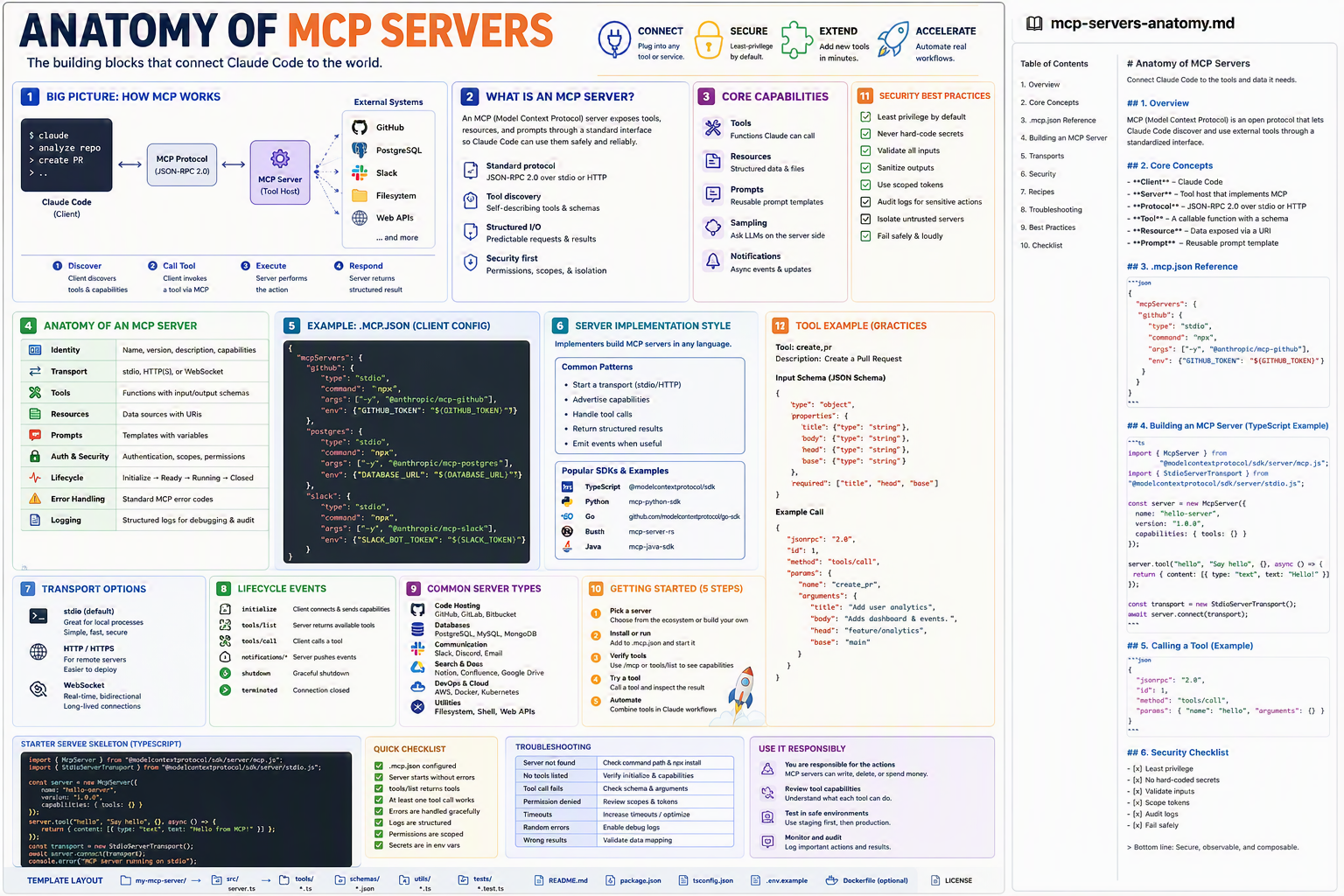
The building blocks that connect Claude Code to the outside world — GitHub, databases, Slack, files, browsers — through one open protocol.
TL;DR
- MCP (Model Context Protocol) is Anthropic's open standard so Claude can talk to any external tool through one common language.
- An MCP server is a small program that exposes Tools, Resources, and Prompts to Claude.
- You configure them in
.mcp.jsonat your project root — Claude auto-discovers them on launch. - Transports: stdio (local, default), HTTP/HTTPS (remote), WebSocket (real-time).
- Treat MCP servers like signed-in employees: least privilege, scoped tokens, audit logs.
Why this matters
Think of Claude as a brilliant consultant locked in a glass office. MCP servers are the doors and badges that let it reach the file cabinet, the database, the Slack channel — without you copy-pasting context. One protocol replaces a dozen bespoke integrations.
Bottom line: MCP is to AI tools what USB is to hardware — plug it in and it works.
The Big Picture
Bottom line: One client, many servers, one protocol.
Core Concepts
| Concept | Plain English |
|---|---|
| Client | Claude Code itself |
| Server | A small program that exposes tools/data |
| Protocol | JSON-RPC 2.0 messages over a transport |
| Tool | A callable function with a JSON Schema |
| Resource | Read-only data exposed via a URI |
| Prompt | A reusable prompt template the server provides |
| Transport | How bytes flow: stdio / HTTP / WebSocket |
| Capability | A feature flag the server advertises at handshake |
.mcp.json Reference
{
  "mcpServers": {
    "github": {
      "type": "stdio",
      "command": "npx",
      "args": ["-y", "@anthropic/mcp-github"],
      "env": { "GITHUB_TOKEN": "${GITHUB_TOKEN}" }
    },
    "postgres": {
      "type": "stdio",
      "command": "npx",
      "args": ["-y", "@anthropic/mcp-postgres"],
      "env": { "DATABASE_URL": "${DATABASE_URL}" }
    },
    "slack": {
      "type": "stdio",
      "command": "npx",
      "args": ["-y", "@anthropic/mcp-slack"],
      "env": { "SLACK_BOT_TOKEN": "${SLACK_TOKEN}" }
    },
    "filesystem": {
      "type": "stdio",
      "command": "npx",
      "args": ["-y", "@anthropic/mcp-filesystem", "./src", "./tests"]
    }
  }
}
💡 Tip: Use
${ENV_VAR}interpolation — never paste raw tokens.
Building an MCP Server (TypeScript)
npm i @modelcontextprotocol/sdk
// src/server.ts
import { McpServer } from "@modelcontextprotocol/sdk/server/mcp.js";
import { StdioServerTransport } from "@modelcontextprotocol/sdk/server/stdio.js";
import { z } from "zod";

const server = new McpServer({
  name: "hello-server",
  version: "1.0.0",
  capabilities: { tools: {} }
});

// Register a tool with input schema
server.tool(
  "create_pr",
  { title: z.string(), body: z.string(), head: z.string(), base: z.string() },
  async ({ title, body, head, base }) => {
    // ... actual GitHub API call here
    return { content: [{ type: "text", text: `PR opened: ${title}` }] };
  }
);

const transport = new StdioServerTransport();
await server.connect(transport);
console.error("MCP server running on stdio");
Then register it in .mcp.json:
"hello": { "type": "stdio", "command": "node", "args": ["./dist/server.js"] }
Calling a Tool (raw JSON-RPC example)
{
  "jsonrpc": "2.0",
  "id": 1,
  "method": "tools/call",
  "params": {
    "name": "create_pr",
    "arguments": {
      "title": "Add user analytics",
      "body":  "Adds dashboard and events.",
      "head":  "feature/analytics",
      "base":  "main"
    }
  }
}
You'll rarely write this yourself — Claude does it for you. But knowing the wire format is gold when debugging.
Transport Options
| Transport | When to use | Tradeoff |
|---|---|---|
| stdio | Local servers (default) | Simple, fast, secure — but one process per client |
| HTTP / HTTPS | Remote / shared servers | Easy to deploy & scale, needs auth |
| WebSocket | Real-time, bidirectional | Long-lived connections; more ops overhead |
Common Server Types You'll Actually Use
- Code hosting — GitHub, GitLab, Bitbucket
- Databases — PostgreSQL, MySQL, MongoDB, Redis
- Communication — Slack, Discord, email
- Search & docs — Notion, Confluence, Google Drive
- DevOps & cloud — AWS, Docker, Kubernetes
- Utilities — Filesystem, shell, generic web APIs
Variants for Different Team Settings
👤 Solo developer
- One
.mcp.json, GitHub + Filesystem only. - Tokens in
~/.env, sourced beforeclaudelaunch.
👥 Small team (2–10)
- Commit
.mcp.jsonwith env-var placeholders. - Add a
.env.exampleso teammates know what to set. - Shared Slack/GitHub bot tokens with scoped permissions.
🏢 Enterprise / regulated
- Host MCP servers behind HTTPS + mTLS.
- Tokens injected from a secrets vault (Azure Key Vault, AWS Secrets Manager).
- Add a gateway server that audits every call.
- Whitelist tools per team in
settings.json.
🌍 Open-source / community
- Publish your server to npm / PyPI / crates.io.
- Ship a
READMEwith copy-paste.mcp.jsonsnippet. - Provide a Docker image so contributors avoid local installs.
Bottom line: Same protocol, different deployment posture as risk grows.
Anatomy of a Single Unit — One MCP Server
| Part | Purpose |
|---|---|
| Identity | name, version, description, advertised capabilities |
| Transport | stdio / HTTP / WebSocket |
| Tools | callable functions with input/output JSON Schemas |
| Resources | URI-addressable read-only data |
| Prompts | reusable prompt templates with variables |
| Auth & Security | tokens, scopes, allowed origins |
| Lifecycle | initialize → ready → running → shutdown |
| Error handling | standard MCP error codes for predictable client UX |
| Logging | structured logs for debugging & audit |
Lifecycle Events
| Event | What happens |
|---|---|
initialize | Client connects, exchanges capabilities |
tools/list | Server returns its callable tools |
tools/call | Client invokes a tool |
notifications/* | Server pushes async events |
shutdown | Graceful close |
terminated | Connection ended |
Common Patterns & Recipes
Pattern 1 — Scoped filesystem access
"filesystem": {
  "type": "stdio",
  "command": "npx",
  "args": ["-y", "@anthropic/mcp-filesystem", "./src", "./tests"]
}
Only those two folders are exposed — Claude cannot escape.
Pattern 2 — Read-only database
"postgres-readonly": {
  "type": "stdio",
  "command": "npx",
  "args": ["-y", "@anthropic/mcp-postgres", "--readonly"],
  "env": { "DATABASE_URL": "${RO_DATABASE_URL}" }
}
Pattern 3 — Remote HTTP server with bearer token
"analytics": {
  "type": "http",
  "url": "https://mcp.mycorp.com/analytics",
  "headers": { "Authorization": "Bearer ${ANALYTICS_TOKEN}" }
}
Pattern 4 — Per-environment overrides via settings.local.json
{ "mcpServers": { "postgres": { "env": { "DATABASE_URL": "postgres://localhost/dev" } } } }
Pattern 5 — Healthcheck command before Claude starts
# scripts/check-mcp.sh
npx -y @anthropic/mcp-github --healthcheck || { echo "MCP github not ready"; exit 1; }
Best Practices ✅
- Least privilege — give each server only the scopes it needs.
- Never hard-code secrets — always
${ENV_VAR}. - Validate all inputs at the server boundary.
- Use scoped tokens (e.g., GitHub fine-grained PATs).
- Audit logs for sensitive actions (writes, deletes).
- Isolate untrusted servers in containers or VMs.
- Fail safely & loudly — return clear error codes.
Anti-Patterns ❌
- One "god" MCP server with full admin rights.
- Tokens committed to the repo.
- Servers that silently ignore unknown args.
- Exposing the entire filesystem (
/). - No timeout on long-running tool calls.
Troubleshooting
| Symptom | Cause | Fix |
|---|---|---|
| "Server not found" | Wrong command or npx not on PATH | Check which npx; install package |
| "No tools listed" | Server never finished initialize | Run server standalone; verify logs |
| Tool call fails | Schema mismatch | Compare args against tools/list schema |
| "Permission denied" | Token scope too narrow | Re-issue with required scopes |
| Random hangs | No timeout configured | Set timeoutMs on the client side |
| Timeouts | Slow upstream (e.g., DB) | Add caching or increase timeout |
| Wrong results | Server reads stale data | Validate data-source mapping |
Starter Server Skeleton (TypeScript, full)
// my-mcp-server/src/server.ts
import { McpServer } from "@modelcontextprotocol/sdk/server/mcp.js";
import { StdioServerTransport } from "@modelcontextprotocol/sdk/server/stdio.js";
import { z } from "zod";

const server = new McpServer({
  name: "hello-server",
  version: "1.0.0",
  capabilities: { tools: {}, resources: {}, prompts: {} }
});

server.tool(
  "hello",
  { name: z.string() },
  async ({ name }) => ({
    content: [{ type: "text", text: `Hello, ${name}!` }]
  })
);

const transport = new StdioServerTransport();
await server.connect(transport);
console.error("MCP server running on stdio");
Template layout:
my-mcp-server/
├── src/server.ts
├── tools/*.ts
├── schemas/*.json
├── utils/*.ts
├── tests/*.test.ts
├── README.md
├── package.json
├── tsconfig.json
├── .env.example
├── Dockerfile         # optional
└── LICENSE
Security Checklist
- Least privilege scopes
- No hard-coded secrets
- Validate all inputs
- Scope tokens per environment
- Audit logs on writes
- Fail safely with standard error codes
Glossary
- MCP — Model Context Protocol, Anthropic's open spec.
- JSON-RPC 2.0 — Lightweight remote-procedure-call format.
- Transport — How JSON-RPC bytes are moved (stdio, HTTP, WS).
- Tool — A server-exposed function Claude can call.
- Resource — Read-only data a server exposes via a URI.
- Prompt — A reusable prompt template provided by the server.
- Capability — A feature flag exchanged during
initialize.
Further Reading
- Search: "Model Context Protocol spec"
- Search: "@modelcontextprotocol/sdk GitHub"
- Search: "awesome MCP servers list"
- Search: "Anthropic MCP quickstart"