Anatomy of Hook Lifecycles
Pre/Post/Stop hooks, matchers, lifecycles, and automation.
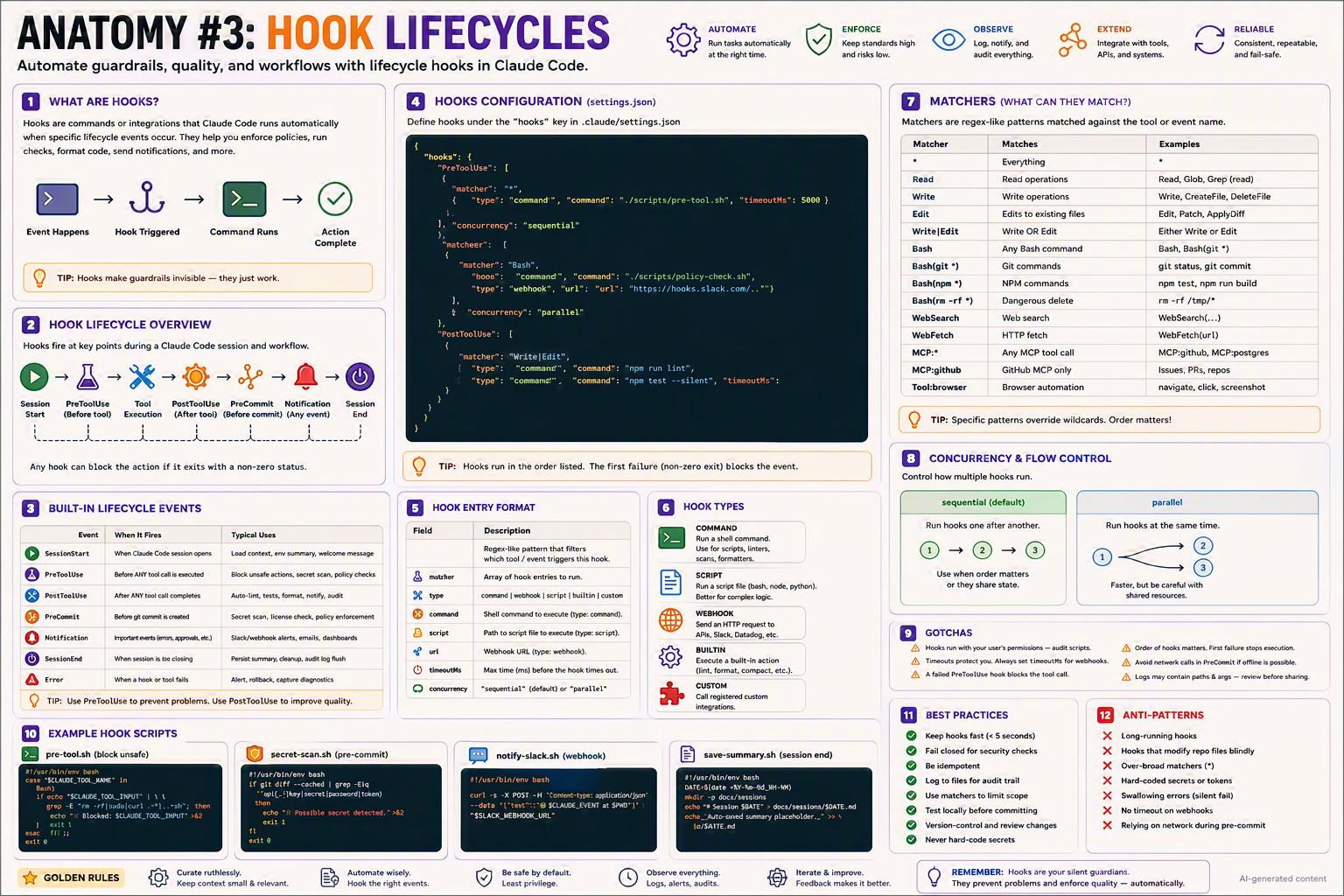
Automate guardrails, quality, and workflows with lifecycle hooks in Claude Code — the silent guardians that turn AI suggestions into AI-with-policy.
TL;DR
- A hook is a command, script, webhook, or built-in action that Claude Code runs automatically at lifecycle events.
- Defined in
.claude/settings.jsonunder thehookskey. - Core events:
SessionStart,PreToolUse,PostToolUse,PreCommit,Notification,SessionEnd,Error. - Use
PreToolUseto prevent problems andPostToolUseto improve quality. - Fail closed for safety, fail open for convenience.
Why this matters
Hooks are seat belts for your AI teammate. You don't think about them every drive, but the one time you need them, they save the trip. They turn AI suggestions into AI-with-policy.
Bottom line: Hooks make AI agents enterprise-ready — by making guardrails invisible.
The Big Picture
Bottom line: Events flow; hooks intercept. Any hook can block the action by returning non-zero.
Hook Lifecycle Overview
Hooks fire at key points during a Claude Code session and workflow:
| Order | Event | Phase |
|---|---|---|
| 1️⃣ | SessionStart | Session opens |
| 2️⃣ | PreToolUse | Before any tool call |
| 3️⃣ | Tool execution | (the actual action) |
| 4️⃣ | PostToolUse | After tool completes |
| 5️⃣ | PreCommit | Before a git commit |
| 6️⃣ | Notification | On important events |
| 7️⃣ | SessionEnd | Session closes |
Plus the cross-cutting Error event whenever a hook or tool fails.
💡 Tip: Any hook can block the action if it exits with a non-zero status.
Built-in Lifecycle Events
| Event | When it fires | Typical uses |
|---|---|---|
SessionStart | When Claude Code session opens | Load context, env summary, welcome message |
PreToolUse | Before any tool call is executed | Block unsafe actions, secret scan, policy checks |
PostToolUse | After any tool call completes | Auto-lint, tests, format, notify, audit |
PreCommit | Before a git commit is created | Secret scan, licence check, policy enforcement |
Notification | Important events (errors, approvals, etc.) | Slack/webhook alerts, emails, dashboards |
SessionEnd | When session is closing | Persist summary, cleanup, audit log flush |
Error | When a hook or tool fails | Alert, rollback, capture diagnostics |
💡 Tip: Use PreToolUse to prevent problems. Use PostToolUse to improve quality.
Hooks Configuration (.claude/settings.json)
{
  "hooks": {
    "PreToolUse": [
      {
        "matcher": "*",
        "hooks": [
          { "type": "command", "command": "./scripts/pre-tool.sh", "timeoutMs": 5000 }
        ],
        "concurrency": "sequential"
      },
      {
        "matcher": "Bash",
        "hooks": [
          { "type": "command", "command": "./scripts/policy-check.sh" },
          { "type": "webhook", "url": "https://hooks.slack.com/...", "timeoutMs": 3000 }
        ],
        "concurrency": "parallel"
      }
    ],
    "PostToolUse": [
      {
        "matcher": "Write|Edit",
        "hooks": [
          { "type": "command", "command": "npm run lint" },
          { "type": "command", "command": "npm test --silent", "timeoutMs": 60000 }
        ]
      }
    ]
  }
}
💡 Tip: Hooks run in the order listed. The first failure (non-zero exit) blocks the event.
Hook Entry Format
| Field | Description |
|---|---|
matcher | Regex-like pattern that filters which tool / event triggers this hook |
hooks | Array of hook entries to run |
type | command · webhook · script · builtin · custom |
command | Shell command to execute (type: command) |
script | Path to script file (type: script) |
url | Webhook URL (type: webhook) |
timeoutMs | Max time (ms) before the hook times out |
concurrency | sequential (default) or parallel |
Hook Types
| Type | What it does | Best for |
|---|---|---|
command 💻 | Runs a shell command | Scripts, linters, scans, formatters |
script 📄 | Runs a script file (bash, node, python) | Complex logic |
webhook 🌐 | Sends an HTTP request | APIs, Slack, Datadog |
builtin ⚙️ | Executes a built-in Claude action | Lint, format, compact |
custom 🧩 | Calls a registered custom integration | Org-specific tools |
Matchers — What Can They Match?
Matchers are regex-like patterns matched against the tool or event name:
| Matcher | Matches | Examples |
|---|---|---|
* | Everything | All tools |
Read | Read operations | Read, Glob, Grep (read) |
Write | Write operations | Write, CreateFile, DeleteFile |
Edit | Edits to existing files | Edit, Patch, ApplyDiff |
Write|Edit | Write OR Edit | Either Write or Edit |
Bash | Any Bash command | Bash, Bash(git *) |
Bash(git *) | Git commands | git status, git commit |
Bash(npm *) | NPM commands | npm test, npm run build |
Bash(rm -rf *) | Dangerous deletes | rm -rf /tmp/* |
WebSearch | Web search | WebSearch(...) |
WebFetch | HTTP fetch | WebFetch(url) |
MCP:* | Any MCP tool call | MCP:github, MCP:postgres |
MCP:github | GitHub MCP only | Issues, PRs, repos |
Tool:browser | Browser automation | navigate, click, screenshot |
💡 Tip: Specific patterns override wildcards. Order matters.
Concurrency & Flow Control
Control how multiple hooks under the same matcher run.
sequential (default)
Run hooks one after another. Use when order matters or hooks share state.
1 → 2 → 3
parallel
Run hooks at the same time. Faster, but be careful with shared resources.
   ┌─ 2
1 ─┤
   └─ 3
"PostToolUse": [
  { "matcher": "Write|Edit",
    "hooks": [
      { "type": "command", "command": "npm run lint" },
      { "type": "command", "command": "npx prettier --write ." }
    ],
    "concurrency": "parallel" }
]
Example Hook Scripts
scripts/pre-tool.sh — block unsafe commands
#!/usr/bin/env bash
case "$CLAUDE_TOOL_NAME" in
  Bash)
    if echo "$CLAUDE_TOOL_INPUT" | grep -Eq "rm -rf|sudo|curl .*\|.*sh"; then
      echo "❌ Blocked: $CLAUDE_TOOL_INPUT" >&2
      exit 1
    fi ;;
esac
exit 0
scripts/secret-scan.sh — pre-commit
#!/usr/bin/env bash
if git diff --cached | grep -Eiq "(api[_-]?key|secret|password|token)\s*=\s*['\"][^'\"]+['\"]"; then
  echo "❌ Possible secret detected." >&2
  exit 1
fi
exit 0
scripts/notify-slack.sh — webhook
#!/usr/bin/env bash
curl -s -X POST -H "Content-Type: application/json" \
  --data "{\"text\":\"🤖 $CLAUDE_EVENT at $PWD\"}" \
  "$SLACK_WEBHOOK_URL"
scripts/save-summary.sh — session end
#!/usr/bin/env bash
DATE=$(date +%Y-%m-%d_%H-%M)
mkdir -p docs/sessions
echo "# Session $DATE" > "docs/sessions/$DATE.md"
echo "_Auto-saved summary placeholder._" >> "docs/sessions/$DATE.md"
Step-by-Step Setup
1. Create the scripts folder
mkdir -p scripts && chmod 755 scripts
2. Drop in a starter pre-tool.sh (see above)
chmod +x scripts/pre-tool.sh
3. Wire it into .claude/settings.json
{
  "hooks": {
    "PreToolUse": [
      { "matcher": "*",
        "hooks": [{ "type": "command", "command": "./scripts/pre-tool.sh", "timeoutMs": 5000 }] }
    ],
    "PostToolUse": [
      { "matcher": "Write|Edit",
        "hooks": [{ "type": "command", "command": "npm run lint" }] }
    ]
  }
}
4. Restart Claude Code
/exit
claude
5. Test
Ask Claude to edit a file → npm run lint should fire automatically.
6. Iterate
Add more matchers as the team's pain points show up.
Variants for Different Team Settings
👤 Solo developer (lightweight)
Lint-on-write only. Skip strict blocking.
"PostToolUse": [{ "matcher": "Write|Edit",
  "hooks": [{ "type": "command", "command": "npm run lint -- --fix" }] }]
👥 Small team (2–10) (shared standards)
Add secret scan + tests on PR.
"PreCommit": [{ "matcher": "*",
  "hooks": [{ "type": "command", "command": "./scripts/secret-scan.sh" }] }],
"PostToolUse": [{ "matcher": "Write|Edit",
  "hooks": [{ "type": "command", "command": "npm test --silent" }] }]
🏢 Enterprise / regulated (fail closed + audit)
- Central audit log, SIEM webhook, code-review required for
settings.jsonchanges.
"PreToolUse": [
  { "matcher": "Bash",
    "hooks": [
      { "type": "command", "command": "./scripts/policy-check.sh" },
      { "type": "webhook", "url": "https://siem.corp/audit", "timeoutMs": 3000 }
    ]
  }
],
"SessionEnd": [
  { "matcher": "*",
    "hooks": [{ "type": "command", "command": "./scripts/audit-flush.sh" }] }
]
🌍 Open-source / community
- Document every hook in
CONTRIBUTING.md. - Make hooks opt-in for contributors (avoid surprise blocks on first clone).
- Provide a
bootstrap.shto set them up explicitly.
Bottom line: Same hook engine, escalating strictness.
Anatomy of a Single Hook — Zoomed In
{
  "matcher": "Write|Edit",                            // when it fires
  "hooks": [
    {
      "type": "command",                              // hook type
      "command": "./scripts/post-write.sh",           // what runs
      "timeoutMs": 10000,                             // safety cap
      "env": { "STRICT": "1" }                        // env vars passed in
    }
  ],
  "concurrency": "sequential"                         // order matters
}
Available env vars inside the script:
$CLAUDE_TOOL_NAME— tool that triggered the hook$CLAUDE_TOOL_INPUT— the input passed to that tool$CLAUDE_EVENT— lifecycle event name$CLAUDE_SESSION_ID— current session id$PWD— workspace root
Common Patterns & Recipes
Pattern 1 — Auto-format after writes
"PostToolUse": [{ "matcher": "Write|Edit",
  "hooks": [{ "type": "command", "command": "npx prettier --write ." }] }]
Pattern 2 — Slack alert on errors
"Error": [{ "matcher": "*",
  "hooks": [{ "type": "webhook", "url": "https://hooks.slack.com/services/..." }] }]
Pattern 3 — Session summary on close
"SessionEnd": [{ "matcher": "*",
  "hooks": [{ "type": "command", "command": "./scripts/save-summary.sh" }] }]
Pattern 4 — Matcher scoping
"matcher": "Write|Edit"   // only file mutations
"matcher": "Bash"         // only shell calls
"matcher": "MCP:*"        // only MCP server calls
"matcher": "*"            // everything (sparingly)
Pattern 5 — Conditional fail-open
#!/usr/bin/env bash
./scripts/policy-check.sh
RC=$?
if [ $RC -ne 0 ] && [ "$STRICT" = "1" ]; then
  exit $RC          # fail closed in strict mode
fi
exit 0              # fail open otherwise
Pattern 6 — Webhook with timeout guard
{ "type": "webhook", "url": "https://hooks.slack.com/...",
  "timeoutMs": 2000 }                         // never hang the session
Pattern 7 — Idempotent post-write
#!/usr/bin/env bash
# Safe to run repeatedly with the same effect
npx prettier --write . >/dev/null
exit 0
Pattern 8 — Compose with slash commands
"PostToolUse": [
  { "matcher": "manual:command",
    "hooks": [{ "type": "command", "command": "./scripts/log-command.sh" }] }
]
Gotchas ⚠️
- Hooks run with your user's permissions — audit script contents.
- A failed
PreToolUsehook blocks the tool call (exit 1to deny). - Timeouts protect you — always set
timeoutMsfor webhooks (1–5 s). - Order of hooks matters — first non-zero exit stops execution.
- Avoid network calls in
PreCommitif offline work is possible. - Logs may contain paths & args — review before sharing.
concurrency: parallelis faster but unsafe if hooks share state.- Matchers are case-sensitive.
- A
*matcher fires on every event — use sparingly.
Best Practices ✅
- Keep hooks fast (< 5 seconds).
- Fail closed for security checks; fail open for cosmetics.
- Be idempotent — safe to run repeatedly.
- Log to files for an audit trail.
- Use matchers to limit scope and reduce noise.
- Test locally before committing.
- Version-control and review hook changes.
- Never hard-code secrets in the command.
Anti-Patterns ❌
- Long-running hooks (60-second test suites in
PostToolUse). - Hooks that modify repo files blindly.
- Over-broad matchers (
*everywhere). - Hard-coded secrets or tokens.
- Swallowing errors silently (
|| true). - No timeouts on webhooks.
- Relying on network in
PreCommitfor offline workflows.
Troubleshooting
| Symptom | Likely cause | Fix |
|---|---|---|
| Hook not running | Wrong matcher regex | Test with "matcher": "*" first |
| Command failed | Script error | Check exit codes & local run |
| Too slow | Heavy script in hot path | Move work off the hot path / async |
| Infinite loop | Hook triggers itself | Add guard condition / matcher exclude |
| No logs | Not logging | Write to .claude/logs/ |
| Webhook hangs session | Missing timeoutMs | Set timeoutMs: 3000 |
| Hook runs twice | Multiple matchers overlap | Tighten matcher patterns |
| Works locally, not in CI | Missing env var | Pass via env: in entry |
Getting Started (5 steps)
- Identify what should be automated (lint, scan, notify…).
- Write or choose a hook script.
- Add to
.claude/settings.jsonunder the right event. - Test with a small task.
- Monitor, log, and iterate.
Starter Template (copy-paste)
{
  "hooks": {
    "PreToolUse": [
      { "matcher": "*",
        "hooks": [
          { "type": "command", "command": "./scripts/pre-tool.sh", "timeoutMs": 5000 }
        ] }
    ],
    "PostToolUse": [
      { "matcher": "Write|Edit",
        "hooks": [
          { "type": "command", "command": "npm run lint" }
        ] }
    ],
    "PreCommit": [
      { "matcher": "*",
        "hooks": [
          { "type": "command", "command": "./scripts/secret-scan.sh" }
        ] }
    ]
  }
}
💡 Tip: Start with
PreToolUse+PostToolUse. Add more events as the team grows.
Glossary
- Hook — A shell command, script, webhook, or built-in action bound to a Claude lifecycle event.
- Event — A point in the session lifecycle (
PreToolUse, etc.). - Matcher — Regex-like pattern that scopes hook execution to specific tools/events.
- Fail closed — Block on error (safe default for security).
- Fail open — Continue on error (safe default for cosmetics).
- Sequential vs parallel — Run hooks one-by-one or all at once.
- Idempotent — Safe to run repeatedly with the same effect.
Further Reading
- Search: "Claude Code hooks documentation"
- Search: "git pre-commit hooks examples"
- Search: "shell hook patterns idempotent"
- Search: "webhook timeout best practices"
🪙 Golden Rules
- 🎯 Curate ruthlessly — keep context small & relevant.
- ⚙️ Automate wisely — hook the right events.
- 🛡️ Be safe by default — least privilege.
- 👁️ Observe everything — logs, alerts, audits.
- 🔁 Iterate & improve — feedback makes it better.
Remember: Hooks are your silent guardians. They prevent problems and enforce quality — automatically.